To make a video game, pick one small idea, choose a tool that matches how you want to build, and get an ugly playable version of the main action working before you touch art or menus. Then add art and sound, watch a few people play, fix what confuses them, and publish it for free on itch.io. Your first game can cost nothing and fit into a weekend.
The tool matters less than most beginners think. First games rarely die because of the engine. They die because the idea was ten times too big.
Prices and fees below are as of November 2026, each with its source linked.
Decide two things first: 2D or 3D, and code or no code
Two questions decide which tool makes sense, so answer them before you download anything.
Should your first game be 2D or 3D?
Make it 2D unless the idea only works in 3D. In 2D you place sprites on a flat plane and the camera mostly follows the player. In 3D you also need a camera that doesn't clip through walls, lighting, animated models and collisions in three axes, and each of those is a small project of its own. A third-person camera alone can eat your first weekend.
3D is the right call when space is the point: a first-person corridor in a horror game, a small world you walk around in, a racing track. Free low-poly packs make that far more doable than it used to be. If that's your plan, read how to make a 3D game before choosing a tool, because 3D narrows the list. Godot, Unity and Unreal all handle it well; Scratch and Construct are built for 2D first.
Code, no code or AI?
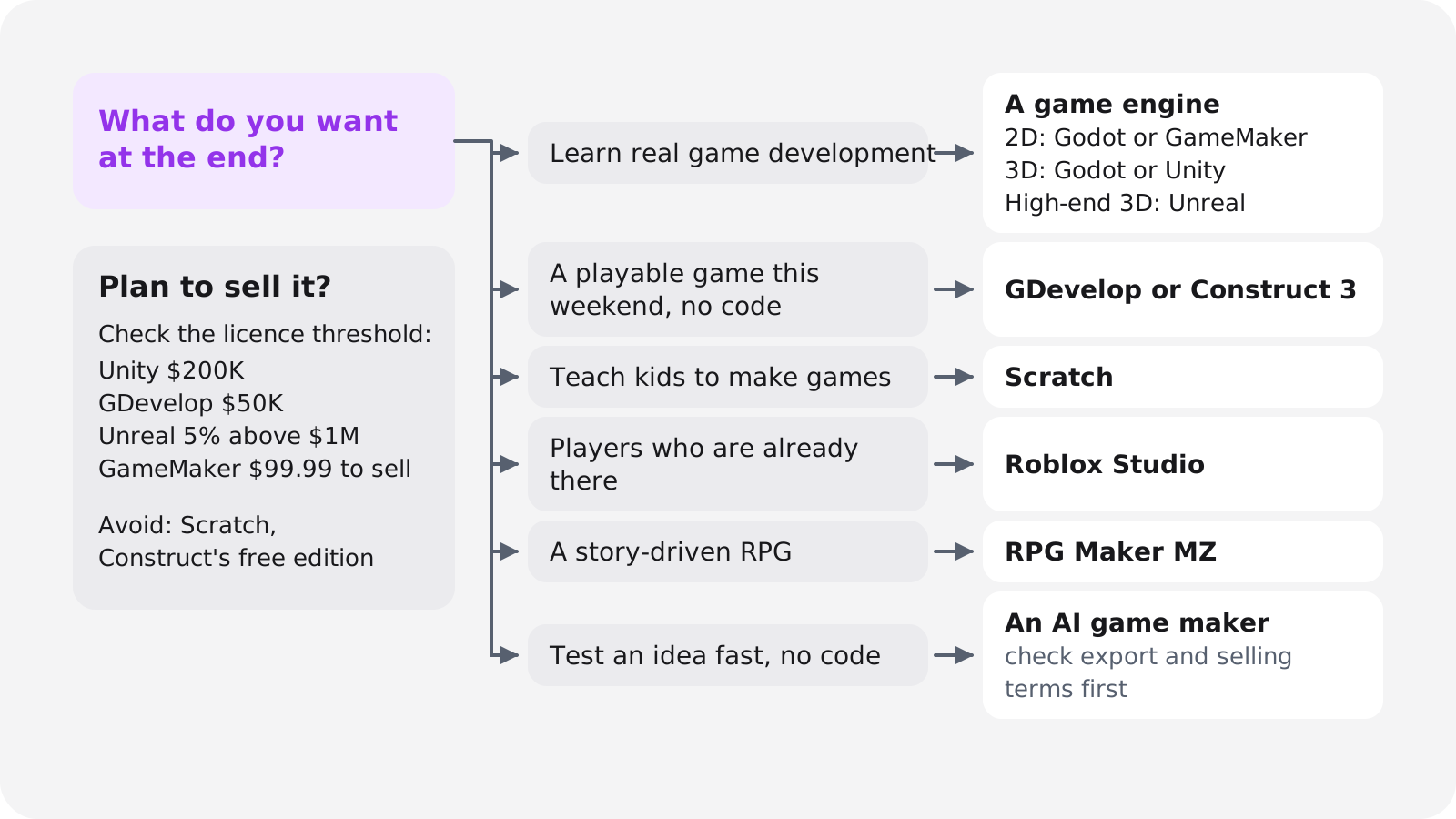
Decide by what you want at the end, not by what sounds easiest.
- You want to learn how games are made, or work in games one day. Use an engine such as Godot or Unity. You'll write some code (GDScript or C#), and that skill carries over to every project after this one.
- You want something playable this weekend and won't write code. Use GDevelop or Construct 3. You build the logic from events such as "when the player touches a coin, add 1 to the score".
- You're teaching a child, or you are one. Use Scratch. It's made for learning and sharing.
- You want players who are already there. Roblox Studio is free, and your game lives inside Roblox.
- You want to tell a story in a classic RPG. RPG Maker MZ is made for exactly that.
- You have an idea, can't code, and want to know if it's fun before you spend weeks on it. Try an AI game maker: you describe the game and play a build. Check what it lets you export and sell before you put serious work in.
- You want to sell it on Steam later. Any path works as long as the tool's terms allow selling. Avoid free editions that forbid it.
Game engine, no-code tool or AI game maker: the three paths compared
All three paths produce real games. They differ in what you have to learn, what they cost once you sell, and what you're allowed to do with the result.
| Game engines | No-code tools | AI game makers | |
|---|---|---|---|
| Examples | Godot, Unity, Unreal, GameMaker, Defold | GDevelop, Construct 3, Scratch, RPG Maker MZ, Roblox Studio | Oryn, Rosebud, Astrocade, GDevelop's built-in AI |
| How you build | Scenes plus code (GDScript, C#, C++, Blueprints, GML, Lua) | Events and behaviours you click together | Describe the game, play the build, ask for changes |
| Cost to start | $0 for all five | $0 for all but RPG Maker MZ | Free tiers with limits |
| Learning curve | Weeks before you feel productive | Hours to a first game | Lowest to start; directing and debugging still take time |
| What you get | Any 2D or 3D game on desktop, mobile and web | Mostly 2D web and mobile games, RPGs, Roblox experiences | Browser games; some tools write a real engine project |
| Ownership and export | Yours, exported anywhere the engine supports | Varies: Construct's free edition can't sell, Roblox games stay on Roblox | Varies most; read each tool's terms |
| Main limit | Time, and getting stuck in tutorials | Feature ceilings and paid exports | Less direct control, credit costs, rules at jams and stores |
Game engines: most control, most to learn
An engine gives you a scene editor, physics, input, audio and export, and you write the game logic yourself. It's the slowest start and the highest ceiling.
Our view, as a team that builds on Godot: if you're willing to write a little code, start with Godot. It's free under the MIT licence with no revenue threshold to watch, and GDScript reads a lot like Python. Godot 4.7 (June 2026) made its Android build environment stable, so you can now export and publish a game from an Android device, and the current stable release is 4.7.2 from 18 August 2026.
Jam developers have noticed: Godot was used for 47% of GMTK Game Jam 2026 entries, ahead of Unity's 34% for the first time (Game World Observer). On Steam it's still small but growing fast, from 0.9% of new releases in 2020 to 7.1% in 2025 (GameDiscoverCo). Our list of famous games made with Godot shows what it can do at full scale.
Choose Unity instead if you want the biggest library of tutorials or plan to work in mobile games. Unity 6 Personal is free until your revenue and funding pass $200,000 in 12 months, the splash screen is optional, and the Runtime Fee was cancelled in September 2024. Unity was behind 49.4% of 2025 Steam releases.
The other three are worth knowing:
- Unreal Engine is free until a game earns $1 million in lifetime gross revenue, then takes 5% of revenue above that; Epic Games Store sales are exempt (Unreal licence). It's the strongest choice for high-end 3D and heavy for a small 2D game.
- GameMaker is a 2D specialist. It's free for non-commercial use, selling needs a one-time $99.99 licence, and console export needs the Enterprise subscription.
- Defold is free with no royalties, uses Lua and exports to consoles, desktop, mobile and HTML5. Version 1.14.0 shipped on 12 October 2026.
Free · MIT licence
Godot 4.7
- 2D and 3D, GDScript or C#
- No royalties and no revenue cap
- Most-used engine at GMTK Game Jam 2026
Free under $200K
Unity 6
- C#, a huge tutorial base
- About half of 2025 Steam releases
- Pro costs $2,310 per seat per year
5% royalty above $1M
Unreal Engine 5
- Built for high-end 3D
- Blueprints visual scripting or C++
- Heavy for a small 2D game
$99.99 once to sell
GameMaker
- Focused on 2D
- Free for non-commercial use
- Consoles need Enterprise
Still deciding between the two most common choices? Our Godot vs Unity comparison goes through the trade-offs in detail.
No-code tools: how to make a game without coding
No-code tools replace typed code with events and behaviours you click together. You still think in conditions and variables, so it's real game logic with less syntax. The ceiling shows up in bigger systems such as inventories, save files and long quest chains, where event sheets get hard to follow.
- GDevelop has a generous free plan: $0 with 40 AI credits a month, unlimited web publishing to gd.games, one desktop or Android export a day and 3 cloud projects. You can sell games made on any plan, including Free, as long as you (or your client) made under $50,000 in revenue or funding in the previous 12 months. It does 2D and 3D.
- Construct 3 is polished, but its free edition works more like a trial: 50 events, 2 layers, publishing only to HTML5 and Construct Arcade, and no selling. Paid editions charge no royalties.
- Scratch is free and made for learning. It's built for sharing, not selling, so if you want to sell a game, use a tool with clear commercial terms.
- RPG Maker MZ costs $79.99 on Steam and is often heavily discounted (it was 61% off in a 2026 sale). It's the shortcut for story-driven 2D RPGs.
- Roblox Studio is free, and the audience comes built in. Be realistic about money, though. Roblox says creators earned over $1 billion through its Developer Exchange in the 12 months to 30 June 2025, but the median creator in the programme received $1,440 (Roblox). Since 5 September 2025, Robux cash out at $0.0038 each.
AI game makers: describe the game, then play it
AI game makers turn a written description into a playable game, and you change it by asking. They're often the quickest way to find out whether an idea is fun, and the path with the widest spread in what you actually get to keep.
So compare them on ownership, not demos. Rosebud is free with 8,000 credits a week, but the free plan has no code download and no commercial rights. Commercial rights start at $30 a month, and downloadable code plus a Windows build for Steam start at $50.
GDevelop's built-in AI is on every plan and can build a feature or start a game from scratch. Astrocade mixes playing and creating casual games with AI, but its homepage doesn't state creation pricing or export terms. Oryn, which we make, writes a real Godot project you can export (more in the AI section below).
For a side-by-side look, see our comparison of the best AI game makers.
How to make a video game in 7 steps
This is the order to work in for a first game, whatever tool you chose.
Pick a tiny idea and write one page
Choose something you can describe in one sentence, with one mechanic and one screen; the game idea generator helps if you're stuck. Then write a one-page game design document that says what the player does, how they win or lose, and what's out of scope.
Find the core loop
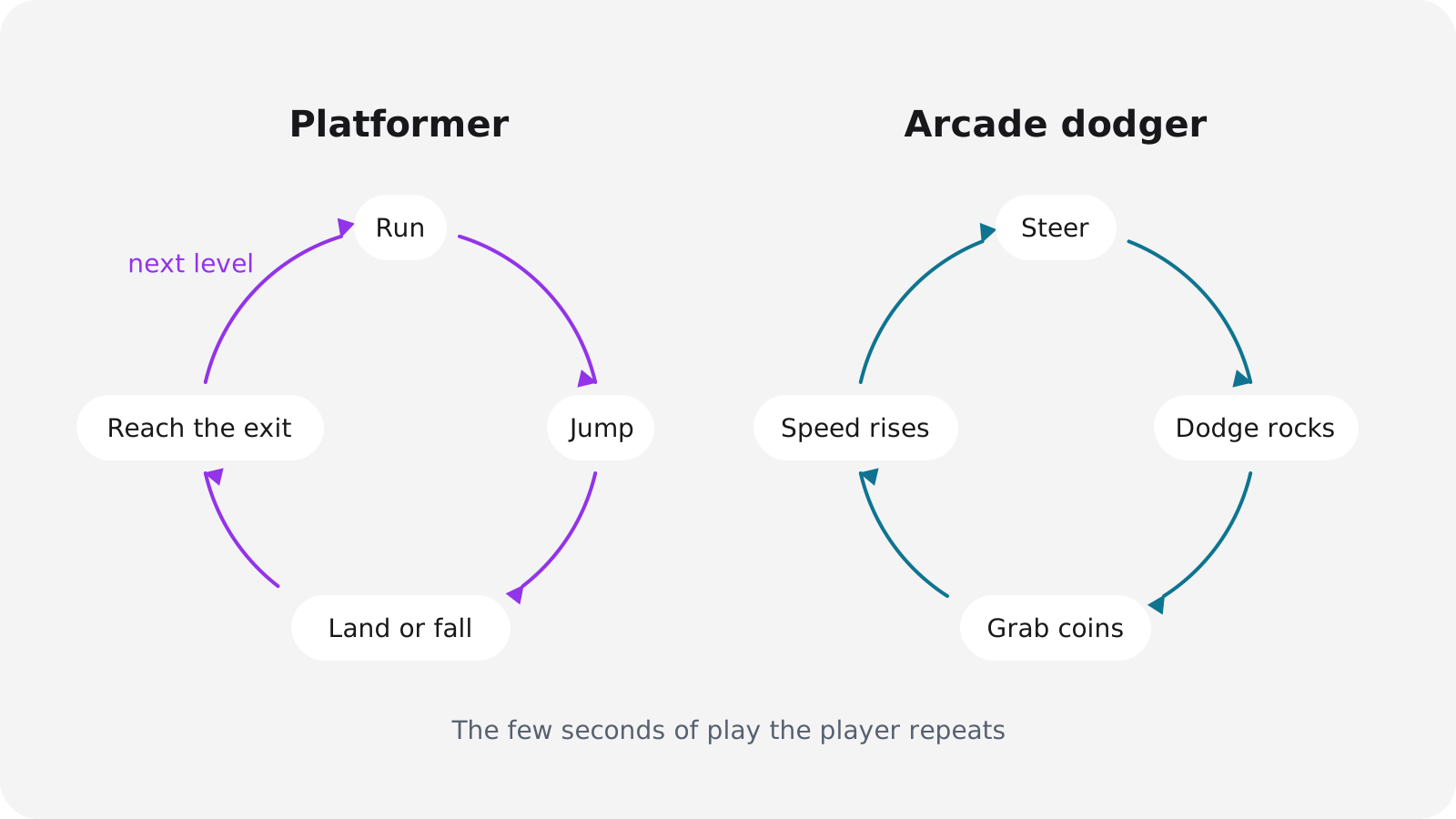
The core loop is the action the player repeats every few seconds: run, jump and land in a platformer; explore, hear something and hide in a horror game. If that loop isn't fun, no amount of content will fix it. Our guides to making a platformer and making a horror game go deeper on those two loops.
Build an ugly prototype
Use grey boxes, one level and no menus. The only question at this stage is whether it's fun with squares, and if it isn't, change the mechanic now while that's cheap.
Add art, sound and music
Swap the boxes for real art once the loop works, using packs whose licences let you sell (table below). Give every jump, hit and pickup a sound; it does more for how a game feels than most beginners expect.
Playtest with people who don't make games
Hand the game to someone, stay quiet and watch. Write down every place they hesitate, get stuck or stop smiling, because those notes are your to-do list.
Polish what the player touches
Add feedback (a small screen shake, a flash, a sound on every hit), a start screen, a restart button and a settings menu. Make sure the controls work on keyboard and gamepad, and on touch if the game will run on phones.
Publish and find your first players
Put it on itch.io for free, or enter it in a game jam so people play it the week it's done. Share the link in a Discord server or subreddit for your genre, then start the next game.
Keep the scope smaller than feels reasonable
Derek Yu, who made Spelunky, argues that the core skill is finishing games reliably, which means going through the whole cycle from idea to release many times. In a 2018 thread (summarised by Game Developer) he says crude tools and messy code are fine if they get the job done, that lukewarm reactions are a reason to finish sooner and move on, and that the most useful feedback comes from people who don't make games.
Extra Credits makes a similar case in its episode on the minimum viable product (Unity Learn): work out which features your game needs to be fun, and you'll usually find it's far fewer than you planned.
For a structured way to practise, the 20 Games Challenge has you recreate classics in order, starting with Pong, Flappy Bird, Breakout, Jetpack Joyride and Space Invaders, and asks you to finish at least ten. It has no deadlines on purpose, to avoid crunch.
A quick test: if you can't fit the whole game on a sticky note, it isn't your first game.
Free art and sound you can use in a game you sell
| Source | What you get | Licence | Credit needed? | Sell your game? |
|---|---|---|---|---|
| Kenney | 2D, 3D, UI and audio packs | CC0 (public domain) | No, optional | Yes |
| Quaternius | Low-poly 3D models, many rigged and animated | Quaternius Asset License (QAL) v1.0 | No | Yes, but you can't resell the models |
| Freesound | Sound effects | CC0, CC BY or CC BY-NC, per sound | Yes for CC BY | Not with CC BY-NC sounds |
| OpenGameArt | Mixed art and audio | Varies per asset | Check each asset | Check each asset |
Two licence traps catch beginners. Many guides still describe Quaternius models as CC0, but its licence page now uses its own Quaternius Asset License: commercial use is fine and no credit is required, but you can't resell or redistribute the models as assets. And on Freesound, sounds marked CC BY-NC can't go into a game you sell, so filter for CC0 or CC BY. Kenney asks only that you don't use its logo.
To make your own assets, Blender is free for any purpose, including commercial work, and Audacity is free for recording and editing sound.
How long does it take to make a game?
A jam game takes a weekend. A tiny first game takes days to a few weeks. A small game good enough to sell usually takes months.
- Game jam: 48 hours for Global Game Jam and the Ludum Dare Compo, 72 hours for the Ludum Dare Jam, and about 96 hours for GMTK Game Jam 2026 (22 to 26 July). GMTK 2026 alone produced about 10,500 entries.
- Tiny first game: days to weeks, if you hold the scope to one screen and one mechanic.
- Small commercial game: one studio blog estimates 3 to 9 months full-time, or 9 to 18 months part-time, for a small polished 2D game, and warns that solo developers underestimate their timelines two to three times over (StraySpark). Treat that as a rough range; no rigorous survey backs it.
Jams are the best first deadline there is. The date can't move, the theme forces a small idea, and you get players and ratings the moment it ends. Global Game Jam runs in late January (the 2026 theme was "Mask"), Ludum Dare runs twice a year, GMTK runs in summer, and itch.io hosts smaller jams all year.
When the deadline gets close, cut features, not quality. Assembla's beginner guide suggests freezing features on a set date for exactly this reason.
How much does it cost to make a video game?
Nothing, until you sell. Most tools are free to learn on and to publish free games with. Money comes in at three points: when your revenue passes a licence threshold, when you pay a store's fee, and when you pay for an AI tool or assets.
Prices as of November 2026 (sources linked in the sections above):
| Tool | Free to start | When you start paying | Price |
|---|---|---|---|
| Godot | Yes | Never | $0, MIT licence |
| Unity 6 | Personal plan | Revenue and funding above $200K in 12 months | Pro: $2,310 per seat per year |
| Unreal Engine 5 | Yes | Lifetime gross above $1M per game | 5% royalty; Epic Games Store sales exempt |
| GameMaker | Non-commercial use | When you sell | $99.99 once; Enterprise for consoles |
| Defold | Yes | Never | $0, no royalties |
| GDevelop | Free plan | Above $50K revenue or funding, or for more exports | Paid tiers; Pro required above $50K |
| Construct 3 | Free edition | To sell, or to export to desktop and mobile | Paid yearly licence |
| RPG Maker MZ | Paid tool | Up front | $79.99 on Steam, often discounted |
| Rosebud AI | 8,000 credits a week | For commercial rights or the code | $30/mo for rights; $50/mo for code and a Windows build |
| Oryn | Designs 3 games and builds the first | To change that game or build another | Paid plans, priced in euros |
Unity's Pro price includes the 5% rise that took effect on 12 January 2026.
How to make a game for free: the $0 stack
- Engine: Godot, or GDevelop's Free plan if you won't code.
- Art: Kenney (CC0) and Quaternius (QAL, free for commercial use).
- Sound: Freesound, filtered to CC0.
- Your own assets: Blender for models, Audacity for sound.
- Hosting: itch.io, or gd.games for GDevelop games.
When you're ready to sell, the cheapest store debut is Steam at $100, which comes back once the game earns $1,000. Both mobile stores together cost $124 in the first year: $25 once for Google Play and $99 a year for Apple. With an AI game maker, the tool's own plan decides whether you can export or sell, so read its pricing page before you build anything you care about.
Where to publish your first game
Put your first game somewhere free and instant, then move to a paid store when people ask for more. As of November 2026:
| Platform | Up-front cost | Revenue share | Before you can release |
|---|---|---|---|
| itch.io | Free | You choose; default 10% | Nothing, publish instantly |
| Poki | Free | 50/50 on traffic Poki sends | Curated; asks for web exclusivity |
| CrazyGames | Free | Not published | Review; clones and reskins rejected |
| Steam | $100 per game, paid back after $1,000 revenue | 30%, lower above $10M | 30-day wait; 2-week coming-soon page |
| Google Play | $25 once | 10% + 5% billing fee on the first $1M (US, EEA, UK) | New personal accounts: 12 testers for 14 days |
| Apple App Store | $99 a year | 15% in the Small Business Program, else 30% | App Review |
| Roblox | Free | Robux cash out at $0.0038 each | Moderation |
Start with itch.io, a web portal or a jam
itch.io is where most first games should go. Publishing is free, you set itch.io's share yourself (the default is 10%, and it can go from 0% to 100%), and big jams such as GMTK run there. If you built with GDevelop or Construct, gd.games and Construct Arcade give you a free link to share in the same way.
Web portals bring players you don't have yet, but they pick which games they accept. Poki splits revenue 50/50 on the traffic it sends and asks for web exclusivity, while still allowing Steam and mobile releases; its developer portal was in closed beta. CrazyGames reviews every submission and screens out clones, reskins and asset flips.
Steam: what $100 gets you
The $100 Steam Direct fee comes back once that game reaches $1,000 in adjusted gross revenue. You wait 30 days between paying and releasing, and the game needs a public coming-soon page for at least two weeks. Valve's cut is 30%, falling to 25% above $10 million and 20% above $50 million.
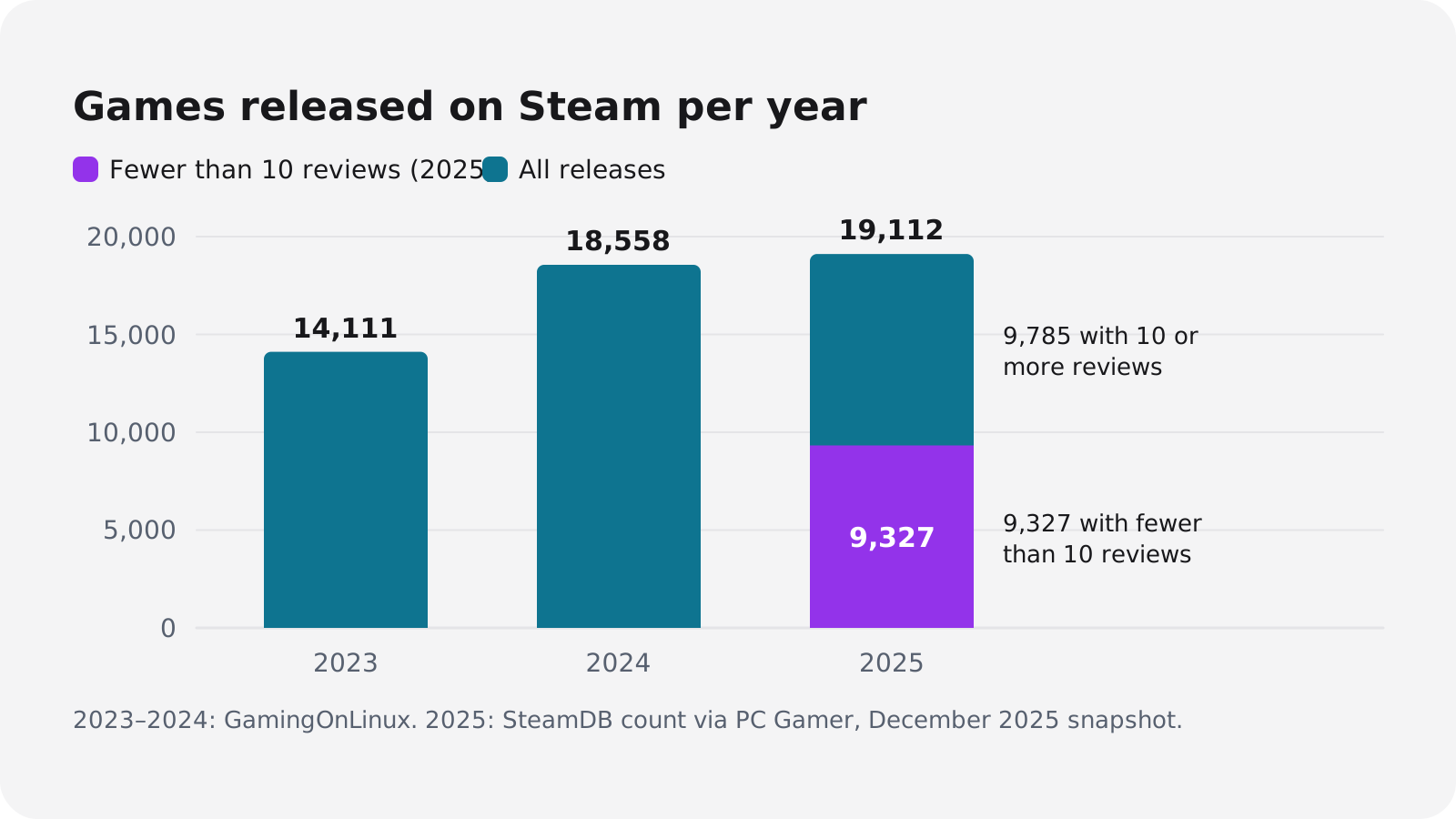
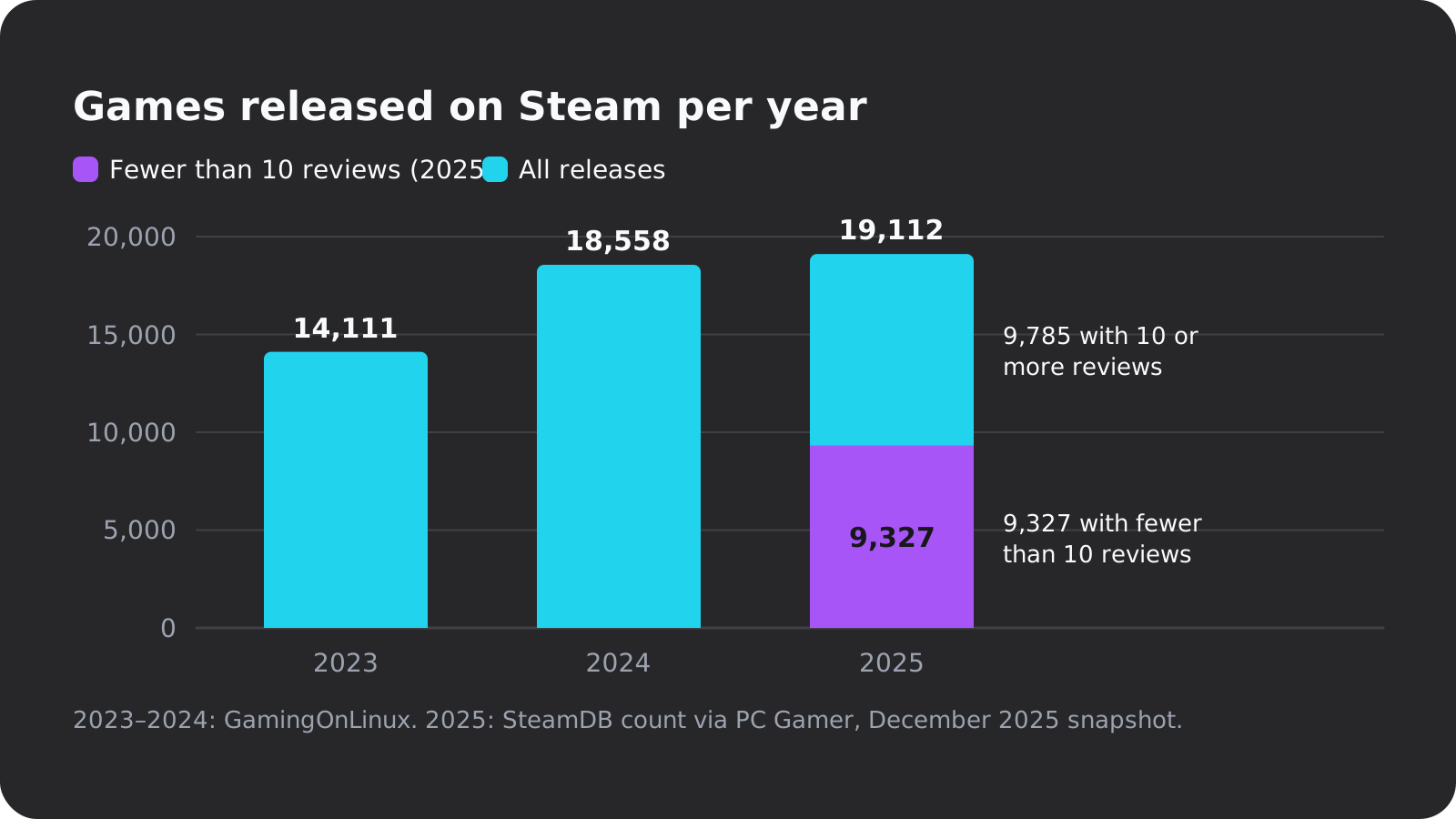
The hard part is attention. More than 19,000 games launched on Steam in 2025, and 9,327 of them had fewer than 10 reviews by December (PC Gamer). That count was 14,111 in 2023 and 18,558 in 2024 (GamingOnLinux).
So build the store page early. Chris Zukowski of How To Market A Game advises, as summarised on Unity's blog, collecting wishlists before Steam Next Fest, because "Next Fest is a multiplier, not a generator", and releasing your demo well before the festival.
Mobile stores
Google Play charges $25 once, but personal developer accounts created after 13 November 2023 must run a closed test with at least 12 testers opted in for 14 days in a row before they can apply for production access. Line up those testers before you need them. Apple charges $99 a year for its developer programme. Touch controls, screen sizes and store rules get their own guide: how to make a mobile game.
How to make a game with AI
AI can often get you from an idea to something playable faster than the other two paths. It can't tell you whether your idea is fun, and its output varies, so you still play, judge and steer. Treat it as one way to build, with its own trade-offs, not a way around the seven steps above.
Where AI helps
- Seeing a playable version of an idea in one sitting
- Boilerplate: menus, input setup, repetitive code
- Placeholder art and sound while you look for the fun
- Explaining an error or a system you don't know yet
Where it falls short
- It can't judge fun; playtesting still decides
- Results vary between runs and need review
- Each tool's terms decide export and commercial rights
- Some jams ban AI art and audio, and Steam asks for disclosure
There are two ways to use it. You can keep your engine and add AI to it, such as GDevelop's built-in assistant or an AI assistant connected to the Godot editor through Godot MCP. Or you can use an AI game maker that plans and builds the whole game while you direct.
How Oryn makes a game
We build Oryn, so here's how it works, including what it doesn't do.
You describe the game in a prompt, optionally with reference images. Oryn asks planning questions one at a time, including which art style to use, then writes a game design document in five parts: game idea, gameplay, progression, look and sound, and scope. You can edit any chapter, and nothing is built until you approve it.
The build (the button says about 30 minutes) writes a real Godot 4 project, with scenes, scripts, input maps, UI and assets, plus a web build you play in the browser. It makes 2D and 3D games; the 3D game maker page shows the 3D side. You ask for changes in chat, and every working version is kept, so you can restore an older one without losing the newer ones.
When it's ready, you can share it on Oryn's games shelf for free, with the visibility set to private, unlisted or public. Or you export it: the full Godot project as a .zip, desktop builds, an Android APK and AAB, an iOS Xcode project or Steam upload scripts. Exports aren't locked to a paid plan. Store accounts, signing and the release process stay with you, and because the project is plain Godot, you can open it in the editor and keep working by hand (more on Godot and AI).
The free plan lets you design up to three games, each with a full design document, reference images, a cover and a logo, and builds your first one with its own art and soundtrack. Changing that game afterwards, or building another, needs a paid plan (see pricing).
The limits, plainly: you must be 18 or older to use Oryn. AI output varies between runs and needs testing. 3D games run with simpler graphics in Safari and on phones, and look best in Chrome on a computer. Some generated assets come from third-party models whose commercial use you need to check.
Rules to know before you ship an AI-made game
- Steam asks for disclosure. Valve requires developers to disclose generative AI content. In January 2026 it rewrote the rules to focus on what players see, and internal tools such as coding assistants reportedly no longer need disclosing (VGC).
- AI is already common on Steam. By July 2025, 7,818 Steam games (about 7% of the library) disclosed generative AI use, including about 1 in 5 games released that year so far (Tom's Hardware).
- Jams set their own rules. GMTK Game Jam 2026 disqualified games that used generative AI art or audio. Read the rules page before you start, not after you submit.
- Ownership depends on the tool and the law. Commercial rights and code export vary by tool and plan, as Rosebud's tiers show. Oryn's own terms add that purely AI-generated material is usually not protected by copyright under current German and EU case law, so read your tool's terms if ownership matters to your plans.
Beginner mistakes that keep first games unfinished
- Making your dream game first. It's too big to finish, and finishing is the skill you're learning. Make it your fifth game, after four small ones.
- Not writing down what's out of scope. Jukka Hilvonen names failing to limit scope as one of the three classic first-game mistakes (Game Developer). A one-page document with an "out" list prevents most of it.
- Living in tutorials. Following tutorials feels like progress, but you learn to finish by finishing. After one tutorial, change one rule and release that.
- Polishing before it's fun. Art and menus on a loop nobody enjoys are wasted work. Stay in grey boxes until testers ask for another round.
- Assuming you know what players want. That's another of Hilvonen's three. Watch people play without explaining, and trust what you see over what they say.
- Launching on a paid store too soon. Hilvonen's third mistake is publishing too soon. Put a free build on itch.io first and save Steam for a game people already want more of.
- Skipping backups. One bad edit can cost you a week. Use version control or your tool's project history from day one; Assembla's guide makes the same point.
- Checking licences at the end. Note the licence of every asset as you add it. CC BY-NC sounds and free editions that forbid selling are the usual problems.
Your next step: pick one idea you can describe in a sentence, choose your tool from the list near the top, and set a deadline you can't move, either this weekend or the next jam on itch.io. When it's playable, put it online and send the link to five people who don't make games.
Frequently asked questions
Can I make a video game for free?
Yes. Godot is free under the MIT licence, GDevelop has a free plan, and Unity Personal is free until your revenue and funding pass $200,000 in 12 months. With CC0 art from Kenney and free publishing on itch.io, a first game can cost nothing.
Can I make a game without coding?
Yes. GDevelop, Construct 3 and Scratch let you build logic from events or blocks, RPG Maker MZ handles story RPGs, and AI game makers build a game from a written description. Free editions can be limited: Construct's free edition allows 50 events and no selling.
How much does it cost to put a game on Steam?
Steam Direct costs $100 per game, which you get back once the game earns $1,000 in adjusted gross revenue. You also wait 30 days after paying and need a public coming-soon page for at least two weeks. Valve's standard cut is 30%.
How long does it take to make a video game?
A game jam game takes 48 to 96 hours, and GMTK Game Jam 2026 produced about 10,500 of them. A tiny first game takes days to weeks, and a small game you could sell usually takes months, often two to three times longer than planned.
What is the best game engine for beginners?
Godot, if you're willing to learn a little code: it's free, handles 2D and 3D, and was the most-used engine at GMTK Game Jam 2026. Pick Unity if you want the most tutorials, and GDevelop or Construct 3 if you'd rather not write code.
Can I sell a game made with an AI game maker?
Only if the tool's terms allow it, so check before you build. Rosebud includes commercial rights from $30 a month and code download from $50 a month, and Oryn lets you export the full Godot project on any plan. On Steam you must disclose generative AI content that players see.
Should my first game be 2D or 3D?
2D, unless the idea only works in 3D. A 3D game adds a camera, lighting, models, animation and collisions in three axes, and each of those can take a weekend on its own.
Can I make a video game on my phone?
Partly. Godot 4.7 made its Android build environment stable, so you can export and publish a game from an Android device, but a computer is still far more comfortable for anything beyond a small project.