To make a 3D game, pick a free engine such as Godot, plan something tiny (one character, one level, one goal), and get the core working on grey boxes before you touch any art: a character controller, a camera, collision and a goal. Then swap the boxes for a free low poly kit in glTF format, light the level, and test the build on a real phone. The rest of this guide is the detail for each step, as of November 2026.
3D isn't twice as hard as 2D. It's harder in a handful of predictable places, and most first projects stall on the same ones: the camera, scale, lighting, the model pipeline and performance on phones. If you've never finished any game, start with our guide on how to make a video game. A finished 2D game teaches you more than an abandoned 3D one.
What makes a 3D game harder than a 2D game?
Godot's introduction to 3D admits that 3D content is a little more difficult than 2D, then explains why. Five things change at once.
The third axis breaks 2D shortcuts
In 2D, the floor is a line and the camera shows everything. In 3D, "forward" depends on where the camera points, gravity pulls along its own axis, and an enemy can be above, below or behind the player. Godot's docs warn that the extra Z coordinate breaks many of the techniques that keep 2D simple.
Scale matters too. Godot treats 1 unit as 1 metre, with Y pointing up, and recommends modelling at the correct scale from the start, because rescaling after import causes problems.
Nothing shows without a camera and a light
A 3D scene displays nothing until it contains a Camera3D, and without lights it renders dark unless the environment itself is bright. The trap: the Godot editor adds a preview sun and sky that exist only in the editor, so a level that looks fine while you build it can run pitch black.
The camera is a system you design
In 2D the camera follows the player. In 3D it decides what the player can see, gets stuck behind walls and changes what "left" means. John Nesky of thatgamecompany built a GDC 2014 talk, 50 Camera Mistakes, around this idea: "The entire experience of playing a game is framed by its camera." His list includes disorientation, misjudged distances and motion sickness.
Every model is a pipeline, not a picture
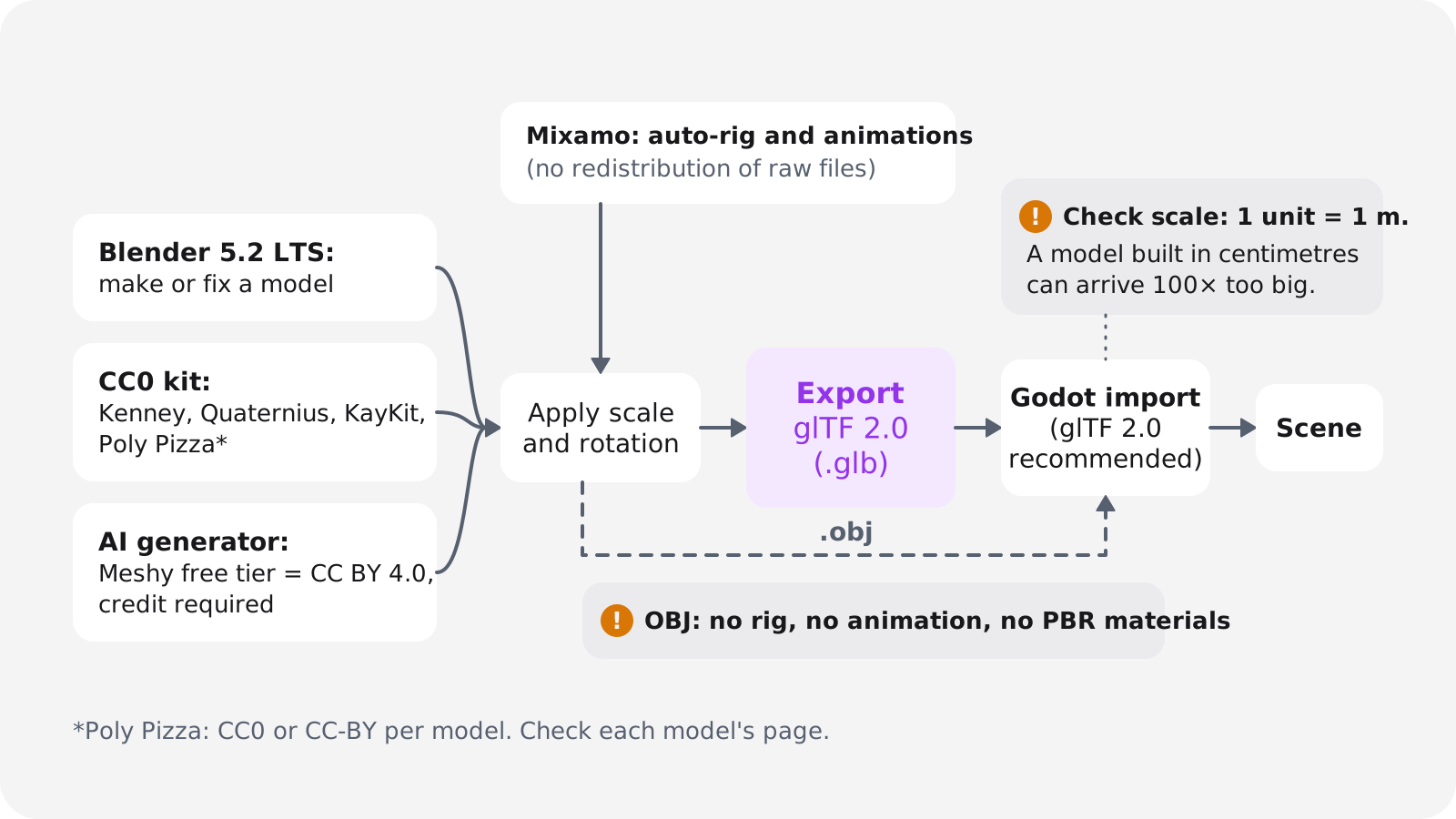
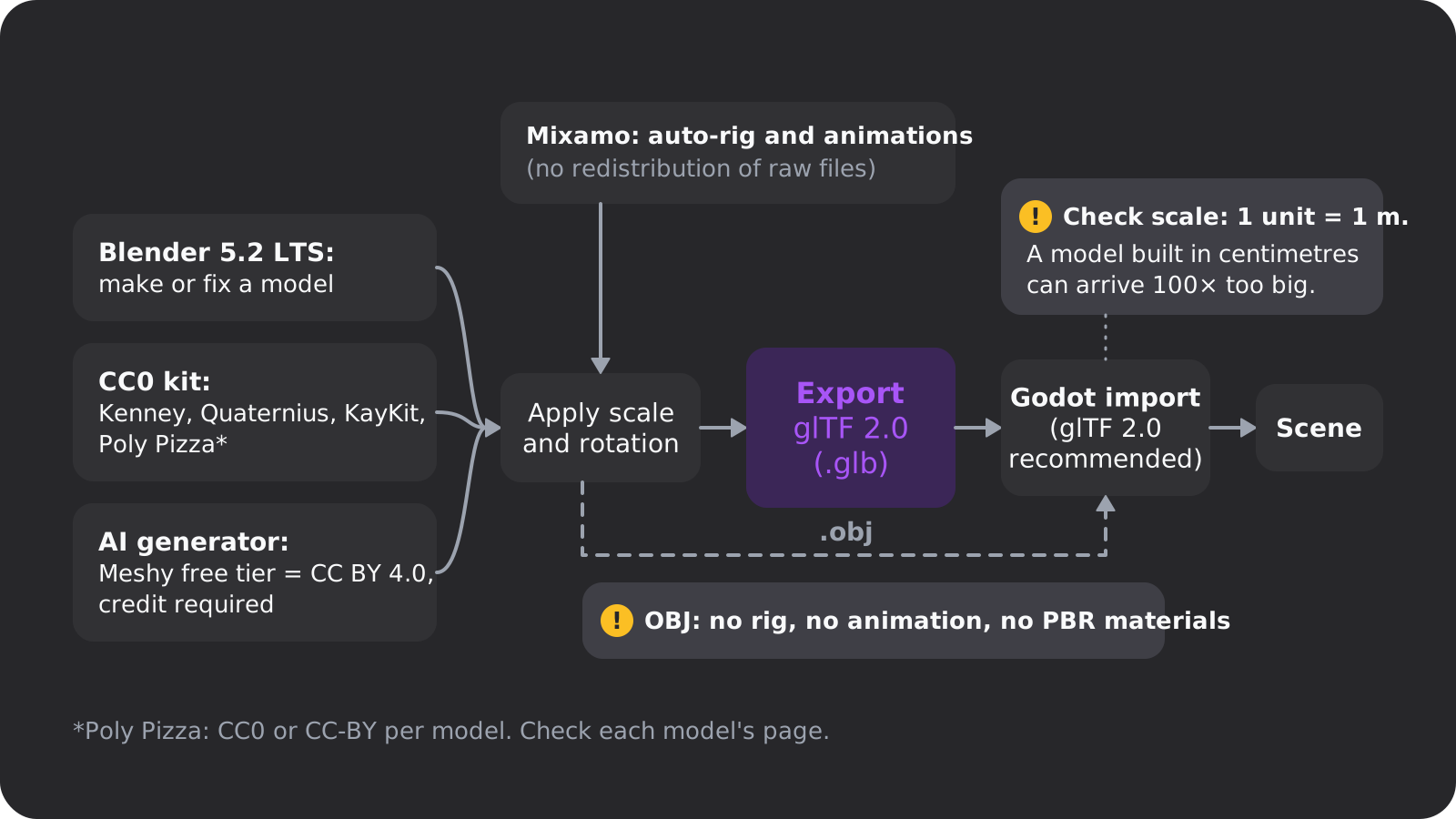
A 2D sprite is an image. A 3D character is a mesh, a UV map, materials and textures, a skeleton (the rig) and a set of animations, made in a modelling tool and exported to an exchange format. The format matters: OBJ can't carry skinning, animation or PBR materials, according to Godot's list of 3D formats, so an animated character needs glTF or FBX.
Light, shadows and phones cost the most
Godot's 3D performance guide calls lighting one of the most costly rendering operations, singles out realtime shadows, multiple lights and global illumination, and recommends baked lighting for mobile. The PlayCanvas optimization guidelines put numbers on it. Each omni light that casts shadows renders the scene 6 times into a shadow map. Low-end phones manage roughly 100 to 200 draw calls, while high-end desktops handle thousands per frame at 60 fps. A draw call is roughly one object with one material, so hundreds of separate props can spend the whole phone budget.
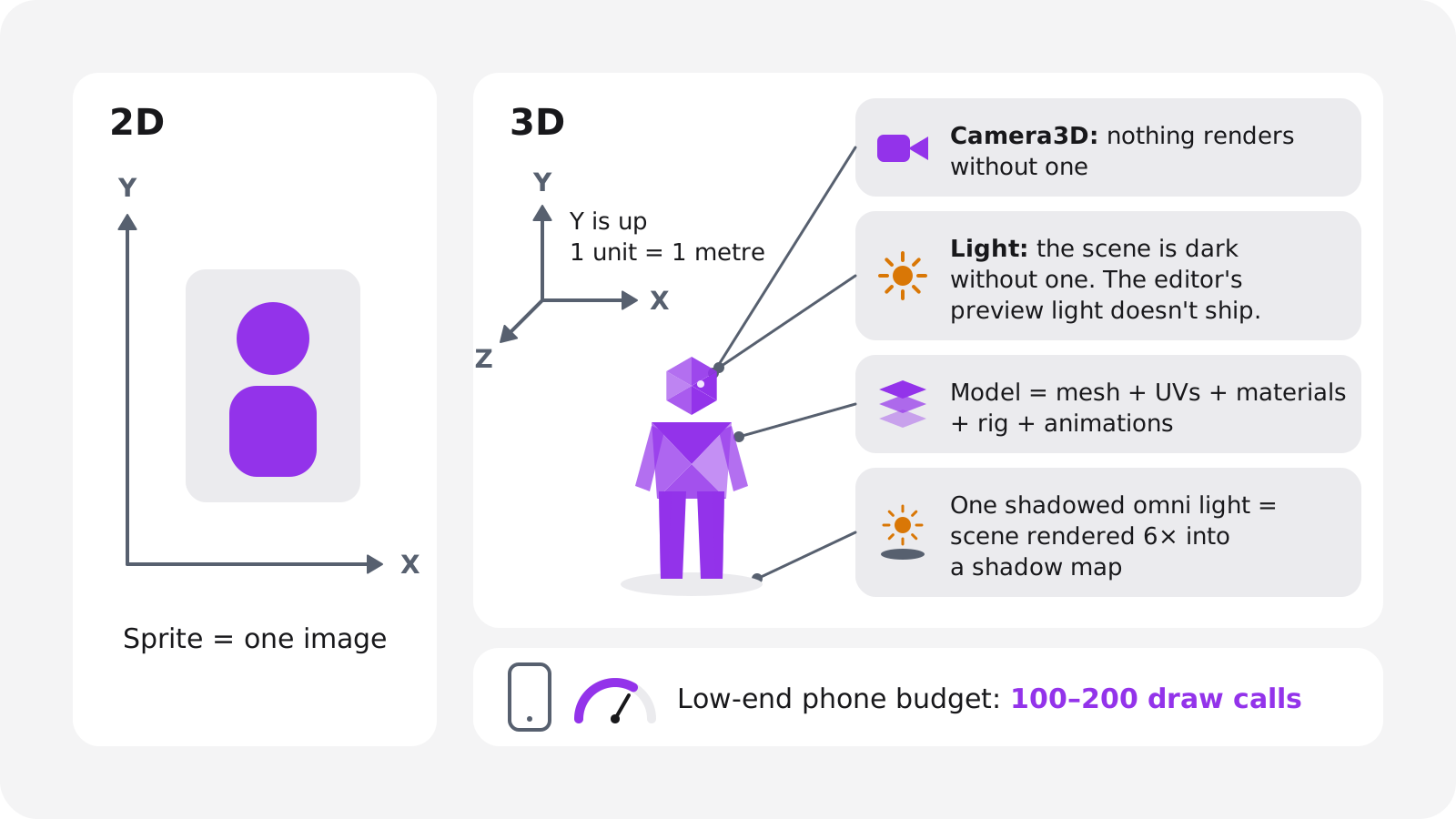
None of these is hard on its own. A first 3D game hits all five at once, which is why the project below is so small.
Which engine should you use for your first 3D game?
Use Godot unless you have a reason not to. It's free under the MIT licence, it has an official 10-part Your first 3D game tutorial, and it exports to desktop, mobile and the web. Godot 4.7 added a built-in VirtualJoystick node for touch screens, plus vertex snapping and a 3D ruler that help when you assemble levels.
Pick Unity if you're aiming at mobile and want C# and its asset store. Pick Unreal for high-end visuals on PC or console, if you accept a steeper start. Pick three.js or Babylon.js if you already write JavaScript and only target the browser.
3D engines and tools, as of November 2026
| Tool | Version (date) | Cost | Web export | Best for |
|---|---|---|---|---|
| Godot | 4.7 (June 18, 2026), 4.8 in beta | Free, MIT licence | WebGL 2 only, no C# | First 3D games, web and mobile |
| Unity 6 | 6.3 LTS | Personal free up to $200,000; Pro $2,310 a year per seat | WebGL 2, WebGPU experimental | Mobile, C#, asset store |
| Unreal Engine | 5.8 (June 17, 2026) | Free; 5% above $1M lifetime gross per product | None built in | High-end PC and console |
| three.js | r187 (Oct 30, 2026) | Free, open source | WebGL 2 or WebGPU | JavaScript developers |
| Babylon.js | 9.33.1 (Oct 30, 2026) | Free, open source | WebGL 2 or WebGPU | Browser games, fuller engine |
| GDevelop | Rolling releases | Free plan: 3 cloud projects, 40 AI credits a month | Yes, on gd.games | No-code beginners |
| Roblox Studio | Rolling releases | Cash-out at $0.0038 per Earned Robux, 30,000 minimum | Roblox only | Games with a built-in audience |
| Blender | 5.2.3 LTS (Oct 22, 2026) | Free, open source | n/a (modelling tool) | Making and fixing models |
Stuck between the two biggest options? Our Godot vs Unity comparison goes deeper, and our list of games made with Godot shows what people have shipped with it.
If you don't want to write code
GDevelop builds games from event sheets instead of scripts and has a 3D editor. AI game makers build the whole game from a description, but they differ in what you end up owning. Rosebud turns a prompt into a Three.js browser game with editable JavaScript that you share as a link. SEELE AI makes Three.js browser games and also offers Unity project packages. Summer Engine is a Godot 4-compatible desktop app that builds Windows and macOS versions. Oryn, which we make, builds a Godot 4 project you play in the browser and can export.
If you want a tool rather than a tutorial, our page on the AI 3D game maker covers Oryn, and the roundup of AI game makers compares the rest. If you do code and want AI help inside the editor, see our Godot MCP guide.
Make your first 3D game, step by step
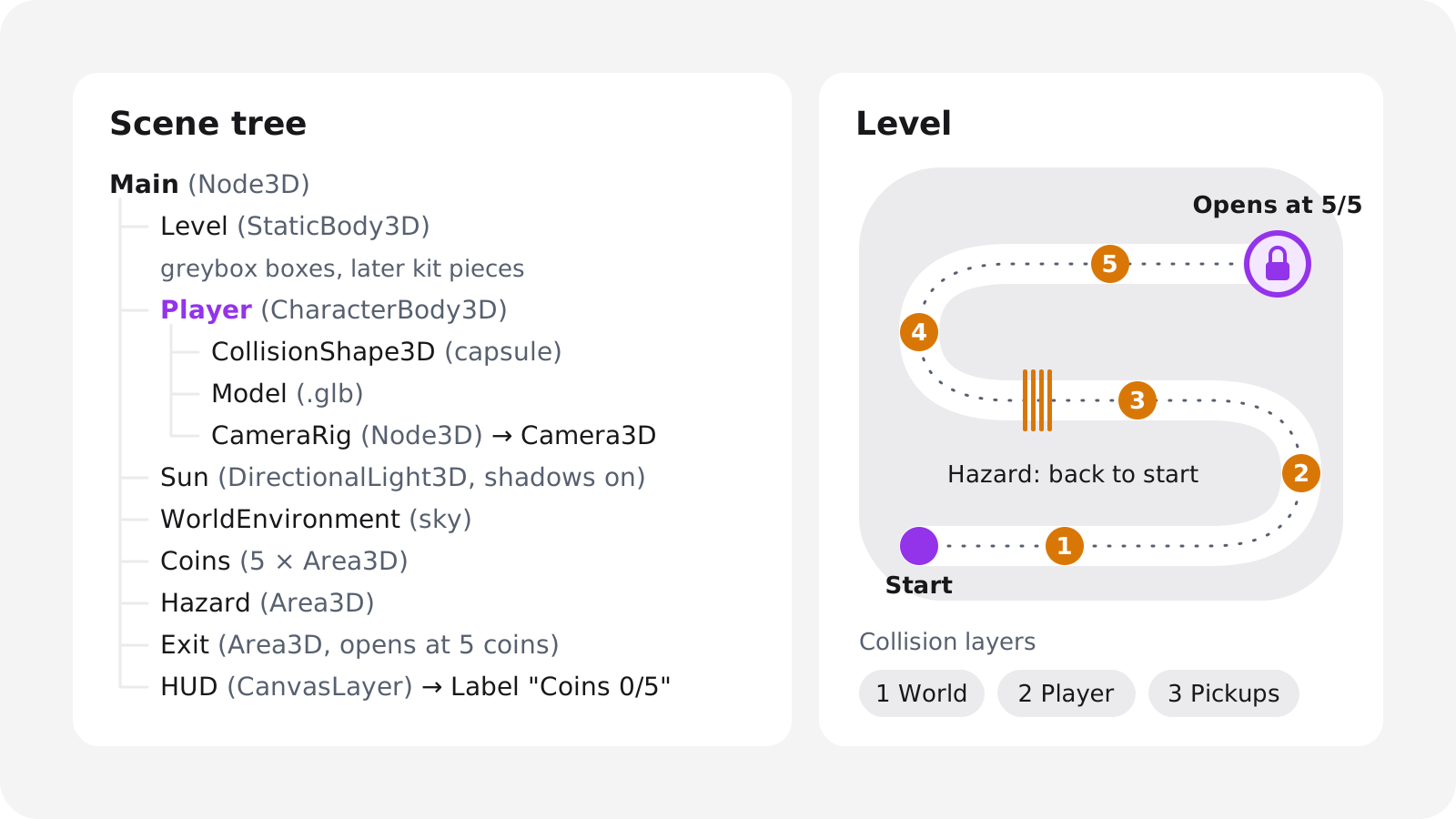
The project is a collect-and-escape level: a small island, five coins, one hazard that sends you back to the start, and an exit that opens once you hold all five. It uses every core 3D system and needs only one animated character. Other first projects of the same size: a one-level 3D platformer, a first-person walk through a dark house (see our horror game guide), or one kart on one track.
The steps use Godot 4.7 names, but the order works in any engine.
Write the plan on one page
Name the camera, the controls, the win and lose conditions, and what you won't build. A one-page game design document is plenty.
Greybox the level
Block out the island with CSG boxes at real scale: at 1 unit per metre, a doorway is about 2 units tall. Boxes tell you whether the level is fun before you spend time on art.
Add the player and the camera
A
CharacterBody3Dwith a capsule collision shape, gravity, movement and a jump, plus a camera rig that follows it. Godot's built-inCharacterBody3Dscript template gives you a working start.Set up collision
Simple shapes on everything that moves, separate layers for world, player and pickups, and
Area3Dtriggers for the coins, the hazard and the exit.Add the goal and the loop
Count coins, open the exit at five, reset the player on the hazard and show the count on screen. Now it's a game.
Swap the boxes for a modular kit
Replace the greybox with pieces from a CC0 kit in glTF format, snapped to a grid.
Light it
One
DirectionalLight3Dwith shadows as the sun, aWorldEnvironmentwith a sky, and baked light for anything else.Add sound, then test and export
Footsteps, a pickup sound and a win sound. Export to the web and play it on a real phone before you call it done.
The character controller
A CharacterBody3D is a physics body you move from code. Each frame you set its velocity from input and gravity, then call move_and_slide(), which slides it along walls and floors instead of stopping dead. is_on_floor() tells you when a jump is allowed. Since Godot 4.6, new 3D projects use the Jolt physics engine by default.
Two details make it feel right. Rotate the input by the camera's facing, so pushing forward always moves the player away from the camera. And check floor_max_angle (the steepest walkable slope) and floor_snap_length (which keeps the player on ramps going down) before you blame your level. Three animation clips cover a first game: idle, run and jump.
The camera: pick one of four setups
Best first choice
Fixed-angle follow
- Sits high behind the player, follows, never rotates
- No mouse-look and few walls in the way
- Reads well on a phone screen
Platformers, adventure
Third-person orbit
- Player turns the camera with mouse or right stick
- Needs a
SpringArm3Dso it doesn't clip through walls - The hardest of the four to get right
Horror, puzzle, shooters
First-person
- Camera at head height, no visible character
- Simplest to build, fewest animations
- Watch field of view and head bob
3D look, 2D controls
Side-on 2.5D
- A 3D world seen from the side
- Movement locked to one plane
- 3D art with controls you know from 2D
For a first 3D game, use the fixed-angle follow camera. It skips the hardest camera bugs and still teaches you 3D movement, and you can switch to an orbit camera once everything else works.
Collision
Three node types cover a first game: StaticBody3D for the level, CharacterBody3D for the player, and Area3D for the coins, the hazard and the exit, which detect the player through their body_entered signal. Give anything that moves a box, sphere or capsule; concave (trimesh) shapes belong only on static floors and walls.
Use collision layers from the start (world, player, pickups) and set each object's mask to what it should detect, so coins never block the player. On import, Godot can generate a collision shape for each mesh, and a simple convex or box shape usually beats an exact copy.
Lighting
Start with one DirectionalLight3D as the sun, shadows on, and a WorldEnvironment with a sky for ambient light and reflections. The editor's preview sun and environment menu can add real ones to the scene, so the running game matches what you see. Keep the sun dynamic and set most other lights to Static so they're baked, as Godot's performance guide suggests. For a low poly game, one strong sun, soft sky light and a few baked lamps are enough.
Build the level from a modular kit
A modular kit is a set of floors, walls, corners, ramps and stairs made on a shared grid, so every piece lines up. Kenney's kits (City Kit, Mini Dungeon, Modular Cave Kit) and KayKit packs such as Dungeon Remastered work this way, and they're CC0.
Set the editor's grid snap to the kit's tile size, then place pieces by hand or turn the kit into a MeshLibrary and paint with a GridMap. Keep your greybox layout, since you already know it plays well. And stay with one kit family: mixing pack authors is the quickest way to make a low poly game look patched together.
Use glTF and free low poly models
Why glTF is the format to use
Khronos describes glTF as a royalty-free format for transmitting and loading 3D scenes efficiently. glTF 2.0 is the international standard ISO/IEC 12113:2022, it defines PBR materials (base colour, metallic, roughness, normal maps and more), and a .glb file packs it all into one binary file. Godot's format list marks glTF 2.0 as recommended. .blend files import only if Blender is installed, FBX goes through the ufbx library since Godot 4.3, and OBJ drops rigs and animation.
The workflow is the same whatever the source. Open the model in Blender if it needs fixing, apply its scale and rotation, export as glTF 2.0 (.glb), and check the size on the first import. A model built in centimetres can arrive 100 times too big.
Why a low poly game is the right first style
Most free 3D libraries are low poly, including Kenney, Quaternius, KayKit and Poly Pizza. That's convenient, and the style suits a first game anyway: low poly models are cheap to render on phones, need few or no textures, and look consistent under simple lighting. Realistic assets need detailed materials, careful light and more memory, and one mismatched model stands out.
Free 3D asset sources and their licences
Free 3D asset sources, as of November 2026
| Source | What you get | Licence | Credit required |
|---|---|---|---|
| Kenney | Thousands of free assets, including 3D modular kits | CC0 | No (don't use the Kenney logo) |
| Quaternius | Low poly packs, many rigged; .blend and FBX | CC0 | No |
| KayKit | Stylized low poly packs in FBX, glTF and OBJ | CC0 (paid EXTRA tiers exist) | No |
| Poly Pizza | 10,700+ low poly models | Mixed: CC0 or CC-BY per model | Yes, for CC-BY models |
| ambientCG | PBR materials and HDRIs | CC0 1.0 | No |
| Poly Haven | HDRIs, textures and 3D models | CC0 | No |
| Meshy free tier | AI-generated models, up to 10 a month | CC BY 4.0 | Yes |
| Mixamo | Auto-rigging and an animation library | Adobe's free, royalty-free terms | No, but no raw-file redistribution |
All of these allow commercial use; the difference is the credit. On Poly Pizza, read the licence on each model's page before you download. Start a credits file on day one and add every source as you go.
Rigging and animation with Mixamo
Adobe's 2022 licensing FAQ calls Mixamo a limited-duration technology preview. Characters and animations are free for commercial and non-commercial use, with no licence or royalty fees, but you can't distribute the raw character and animation files. A September 2026 guide from Cinevva reports it still works free with an Adobe ID, though not with Enterprise or Federated IDs. Since it's still a preview, keep the animations you download inside your project.
AI 3D model generators: read the licence first
Meshy's free tier gives you 100 credits a month (up to 10 assets) under CC BY 4.0, so commercial use needs a credit; on paid plans you own what you create. Tencent's open-weights Hunyuan3D 2.1 needs about 10 GB of VRAM for shapes and 21 GB for textures, and the Hunyuan3D 2 licence doesn't apply in the European Union, the United Kingdom or South Korea. Treat any generated mesh as a starting point and check its topology and scale in Blender before you rig it.
Make your 3D game run in a browser and on phones
A browser build is the fastest way to get feedback: you send a link, and people play. Two graphics APIs decide what runs where.
3D graphics in browsers, as of November 2026
| Browser | WebGL 2 | WebGPU |
|---|---|---|
| Chrome and Edge, desktop | Chrome 56+, Edge 79+ | 113+ on Windows, macOS, ChromeOS; Linux in progress |
| Chrome on Android | Yes | 121+ on Android 12+ with Qualcomm or ARM GPUs |
| Firefox, desktop | 51+ | 141 on Windows, 145 on Apple-silicon Macs |
| Safari on macOS | 15+ | 26 (listed as partial) |
| Safari on iPhone and iPad | 15+ | 26+ |
| Global support | 97.13% | 87.82% |
Sources: caniuse for WebGL 2, caniuse for WebGPU and web.dev. caniuse still marks Firefox's WebGPU as disabled by default, so count Firefox as partial. WebGL 2 is what you can rely on. WebGPU is a bonus where it exists.
What Godot's web export can and can't do
Godot's web export docs are clear about the limits. Godot 4 targets only WebGL 2 on the web, through the Compatibility renderer, so the Forward+ and Mobile renderers aren't available there, and there's no WebGPU support yet. C# projects can't be exported to the web. The docs recommend a Chromium-based browser or Firefox because of Safari's WebGL 2 issues, and gzip shrinks the .wasm file to around a quarter of its size. A WebGPU backend sits on Godot's priorities page as a proposal, with no version target.
The practical rule: if the web is a target, create the project with the Compatibility renderer and write it in GDScript, so the editor shows what the browser will. For comparison, Unity 6 web builds run in Android and iOS mobile browsers, Unreal moved HTML5 out of the engine in version 4.24, and three.js and Babylon.js can render with either WebGPU or WebGL 2.
Performance budget for phones and the web
| Item | Rule of thumb | Source |
|---|---|---|
| Draw calls | 100 to 200 on a low-end phone | PlayCanvas |
| Shadowed omni lights | Each renders the scene 6 times; avoid | PlayCanvas |
| Lights | One dynamic sun, bake the rest | Godot |
| Many identical props | Use MultiMesh | Godot |
| Mesh detail | Use the LODs Godot generates on import | Godot |
| Download size | Gzip the .wasm to about a quarter | Godot |
| Triangles | No official cap; test on a mid-range phone | None published |
MultiMesh matters more than it looks. Godot's automatic instancing, which cuts draw calls, runs only in the Forward+ renderer, so web builds don't get it, while MultiMesh draws many thousands of identical objects (grass, rocks, coins) at little cost. Godot's docs also note that WebAssembly is slower than native code and that phones have little CPU and GPU time to spare.
Touch controls
Map touch, keyboard and gamepad to the same input actions, so one control scheme works everywhere, and use Godot 4.7's VirtualJoystick node for the on-screen stick. Our guide to making a mobile game covers the rest of the phone side.
Can AI make a 3D game for you?
Yes, with limits worth knowing. Oryn, the AI game maker we build, produces the same kind of project this guide describes: a real Godot 4 project with scenes, scripts, input maps, UI and assets, plus a web build you play in the browser.
You describe the game, optionally with reference images. Oryn asks planning questions one at a time, including which art style to use, writes a game design document for you to approve, and builds nothing until you do. The build button reads "Build Game ~30 min". After that you play it and ask for changes in chat. Every working version is kept, and restoring an old one leaves the newer ones in history.
A lot of this guide carries over. Oryn's bundled library includes CC0 models and modular level pieces, every game ships a CREDITS.md that lists the engine and asset sources, and every game stays playable with keyboard, gamepad and touch. The limits are real too. AI output varies between runs and needs testing, 3D games run with simpler graphics in Safari and on phones (Chrome on a computer shows them best), and some generated assets need a commercial-use check.
You can export the full Godot project as a .zip, open it in Godot and carry on by hand with the steps above. The free plan designs up to three games and builds your first one; changing it after that needs a paid plan (see pricing). Finished games can go on the public games shelf, where others can play and remix them.
How long does it take to make a 3D game?
Nobody publishes a reliable figure for this, so these are our estimates for someone new to 3D:
- Godot's official 10-part tutorial: roughly 2 to 20 hours, depending on what you already know.
- The collect-and-escape game above, by hand: a few weeks of evenings.
- With an AI game maker: the planning questions plus one build (Oryn labels it about 30 minutes), then as many rounds of changes as you want.
- Original characters, animation and several levels: far longer. That's the jump from a first game to a second one.
Expect the camera and the feel of movement to take longer than the art.
Common mistakes in a first 3D game
- Starting with an open world. One level, one goal. Add a second level once the first one is fun.
- Ignoring scale. Godot works in metres. Fix scale in Blender before export, not after import.
- Detailed meshes as colliders. Boxes, capsules and simple convex shapes work, and the player can't tell.
- Expecting desktop effects in a browser. Forward+ effects such as SDFGI and volumetric fog won't appear in a Godot web build, and a C# project can't be exported to the web at all.
- Skipping the licence check. Poly Pizza's CC-BY models and Meshy's free models need a credit, Hunyuan3D's licence excludes the EU, UK and South Korea, and Mixamo's raw files can't be redistributed.
- Testing only in desktop Chrome. Safari has WebGL 2 issues and phones are slower, so test on both.
Your next step: download Godot 4.7, create a project with the Compatibility renderer if you want a web build, and give your first session to steps 2 and 3 only. A box floor, a capsule that walks and jumps, a camera that follows it. If that feels good to move around in, everything after it is additions.
Frequently asked questions
Is it harder to make a 3D game than a 2D game?
Yes, in specific places. The extra axis breaks many 2D shortcuts, nothing shows without a camera and lights, every model needs a 3D pipeline, and Godot's documentation names lighting as one of the most expensive parts to render.
What is the best free engine for a first 3D game?
For most beginners it's Godot 4.7: free under the MIT licence, with an official Your first 3D game tutorial and exports to desktop, mobile and the web. Unity Personal is free up to $200,000 in revenue and funding, and Unreal is free until $1 million in lifetime gross revenue per product, then charges 5%.
Can I make a 3D game without coding?
Yes. GDevelop has a no-code 3D editor built on event sheets, and AI game makers build the game from a description. Oryn, for example, builds a real Godot 4 project that you play in the browser and can export.
Can I make a 3D game in Scratch?
Not a real one. Scratch has no built-in 3D tools, so 3D Scratch projects rebuild 3D rendering out of 2D blocks, as the Scratch Wiki explains. For a first real 3D game, use Godot or an AI game maker.
Where can I get free 3D models for a game?
Kenney, Quaternius, KayKit, ambientCG and Poly Haven publish CC0 assets you can use commercially without credit. Poly Pizza mixes CC0 and CC-BY models, so check the licence on each model's page.
Is Mixamo still free?
Yes. As of September 2026 it still works for free with an Adobe ID. Adobe's terms call it a technology preview: characters and animations are royalty-free for commercial use, but you can't redistribute the raw character and animation files.
What file format should I use for 3D game models?
glTF 2.0, ideally as a single .glb file. It's an ISO standard with PBR materials, Godot recommends it, and unlike OBJ it keeps rigs and animations.
Can a 3D game run in a browser and on phones?
Yes. WebGL 2 works in about 97% of browsers and WebGPU in about 88%. Godot's web export uses WebGL 2 and can't export C# projects, and low-end phones handle roughly 100 to 200 draw calls, so keep scenes simple.