To make a mobile game, pick one mechanic you can play with a thumb, build it in a free engine like Godot, Defold or Unity, and test it on a real phone from the first week. Then publish it on Google Play, on the App Store, or as a web game that plays in any phone browser. Making the game is the fun half. The store half is paperwork, and in 2026 it has teeth: a new personal Google Play account needs 12 testers for 14 days before it can go live, and Apple only accepts builds made with Xcode 26 on a Mac.
Every price and rule below was checked in November 2026. For the process on any platform, see how to make a video game. This page is about what changes when the screen is a phone.
What you need before you start
A computer, a phone to test on, and later a developer account for each store you want to be in.
A computer, and when it has to be a Mac
Any Windows, Mac or Linux computer can build an Android game or a web game. The iPhone is the exception: since April 28, 2026, App Store uploads must be built with Xcode 26 or later, and Xcode runs only on macOS. Godot and Defold both build for iOS only on a Mac. No Mac? Rent one by the minute: Codemagic's free plan includes 500 macOS M2 minutes a month, then $0.095 a minute (as of November 2026).
Building on the phone itself is still a stretch. Godot's Android editor is experimental, and Godot recommends a keyboard and mouse for it. And Roblox Studio runs only on Windows and Mac.
A real phone
Test on your own phone from the first week. An emulator won't tell you that your thumb covers the enemy you're meant to dodge, or that the phone gets warm after ten minutes. An older Android phone is a bonus, because slow hardware finds performance problems before your players do.
Pick your route
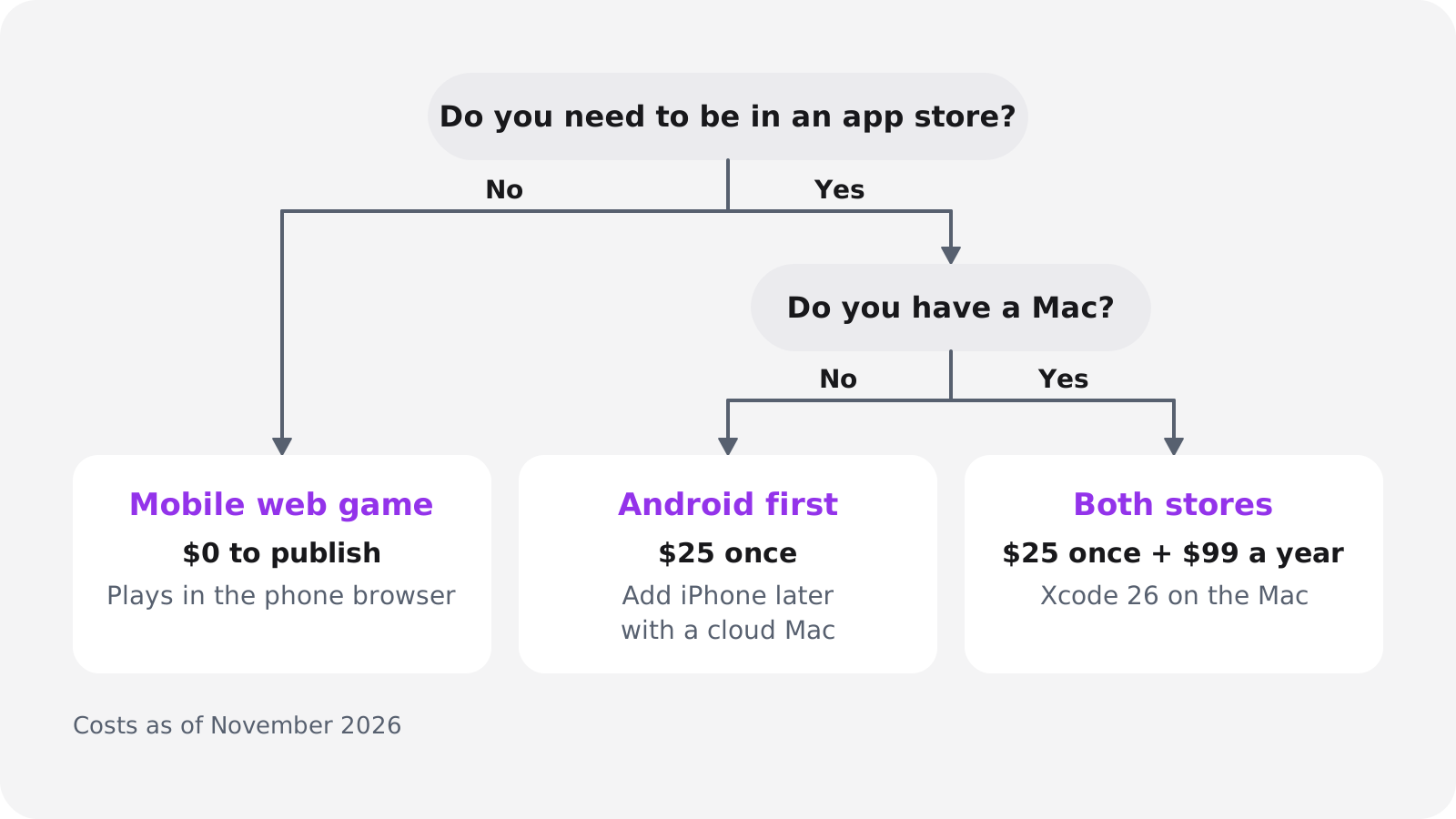
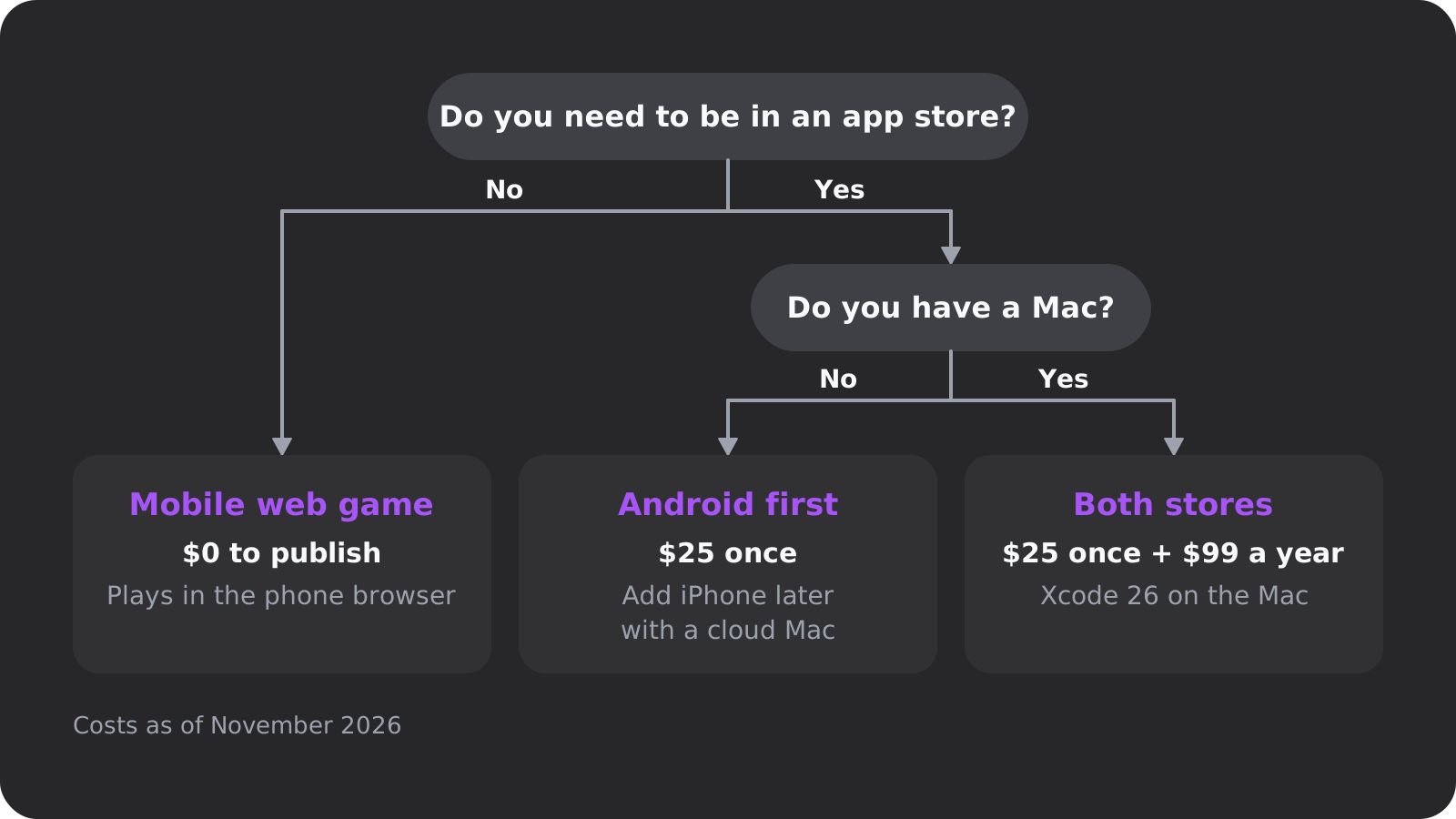
$0 · no review
Mobile web game
- Plays from a link on iPhone and Android
- No fee, no tester rule, instant updates
- Slower than native, no store search
$25 once
Android first
- Any computer works
- 12 testers for 14 days on a new personal account
- Far more game downloads than the App Store
$99 a year plus a Mac
iPhone first
- Xcode 26 on macOS, or a cloud Mac
- App Review, but no tester rule
- More purchase revenue than Google Play
$124 in year one
Both stores
- The most players and the most paperwork
- Two sets of privacy forms and age ratings
- Best saved for a game people already like
The stores pull in different directions. Sensor Tower counted 42 billion game downloads on Google Play in 2025, more than four times the App Store, while the App Store earned 75% more gaming in-app purchase revenue. US phones split almost evenly: iOS had 51.96% and Android 48.02% of mobile web traffic in October 2026 (StatCounter).
Our advice: put a web build in front of people before you pay for any store. It costs nothing, shows whether anyone plays past the first minute, and gives you a link for recruiting the 12 Google Play testers you'll need anyway. Then go Android first if you don't own a Mac, and add the iPhone once the game has earned the $99.
Pick an idea that fits a phone
A good first mobile game has one mechanic you can explain in a sentence and play with one thumb, in short bursts. Ideas that fit:
- One-tap arcade: tap to jump, flap or switch lanes. Flappy Bird took two to three days to make.
- Endless hopper: Crossy Road took about 12 weeks.
- Merge or match puzzle: drag, drop, combine.
- Idle game: a few taps, then upgrades that pay while the player is away.
- Card or turn-based game: no reflexes, so touch precision stops mattering.
- Short platformer: harder on touch, because precise jumps need real buttons. See how to make a platformer.
Start in 2D. A 3D camera and touch controls are two hard problems, and either one can eat your first month.
Portrait or landscape?
Decide before you build, because the camera, the interface and the controls all depend on it. Portrait is one-handed and suits tap, swipe and puzzle games. Landscape gives you two thumbs and a wider view for steering, platforming or a virtual stick. Web portals have rules too: CrazyGames wants games to play in landscape on desktop, accepts portrait with side bars, and asks phone players to rotate.
Design for the first minute
GameAnalytics' 2026 benchmarks, built on 2025 data from 16,262 mobile games, put median day-1 retention at about 22% and day-7 at just under 4%, as summarized by GameDev Reports. Even the top quarter of games keep only a little over 30% on day 1, and their sessions average about 5.2 minutes. So teach the mechanic by letting people play it in the first seconds, not with a tutorial screen, and keep a run short enough to finish at a bus stop.
Then write a one-page game design document: the mechanic, the controls, the orientation, how a run starts and ends, and how the game makes money, if it does.
Choose an engine for your game app
Every mainstream engine is free to start, so price rarely decides it. On a phone, what matters is the language, how heavy the engine is, whether it makes a decent web build and how small the download stays. As of November 2026:
| Engine | Price | How you build | Phone web build | Best for |
|---|---|---|---|---|
| Godot 4.7 | Free, MIT, no royalties | GDScript, C#, C++ | Yes, except C# projects | Light 2D and 3D, beginners who code |
| Unity 6 | Free under $200K; Pro $2,310 per seat a year | C# | Yes, but heavy | 3D, ad and purchase plugins |
| Unreal Engine 5 | Free; 5% royalty above $1M | Blueprints, C++ | Not a beginner path | Ambitious 3D |
| GameMaker | Free non-commercial; $99.99 once to sell | GML or visual | Yes | 2D arcade and platformers |
| Defold 1.14 | Free, no royalties | Lua | Yes | Small builds, web plus mobile |
| Flutter + Flame | Free, open source | Dart | Yes | 2D casual and turn-based |
| GDevelop | Free plan with 1 Android build a day | No-code events | Yes | No-code 2D |
| Construct 3 | Free version has no mobile export | No-code events | Yes | No-code 2D |
| Oryn | First game built free, then paid plans | Plain-English description | Yes, built in | Non-coders, fast prototypes |
Sources: Godot releases and web export docs, Unity, Unreal, GameMaker, Defold, Flutter, GDevelop, Construct.
If you code, start with Godot. Oryn builds Godot projects, so we're not neutral, but the reasons hold: it's MIT-licensed with no royalties, and one project exports to Android, iOS and the web. Godot 4.7 shipped on June 18, 2026, and its single-threaded web export, the default since 4.3, works well on iOS and on Poki and CrazyGames. Browse games made with Godot, read Godot vs Unity for the head-to-head, or see Godot MCP if you code with an AI assistant.
Unity is the mobile incumbent: its mobile page says over 70% of the top 1,000 mobile games were made with it, citing Apptopia data from Q4 2022. Pro rose 5% on January 12, 2026, and CrazyGames disables Unity web games on iOS by default because of memory crashes. Defold (1.14.0, October 12, 2026) is built around a small engine footprint, which keeps downloads light for phones and portals, and Flutter's Casual Games Toolkit suits app developers making 2D games.
If you don't code, GDevelop and Construct are the closest thing to a mobile game maker app, with event sheets instead of code. Anyone under $50,000 in revenue or funding can use GDevelop commercially, even on the free plan. Construct's free version caps you at 25 events as a guest (50 signed in) and two layers. Both include iOS builds on paid plans, so check their docs for whether you still need a Mac.
If you'd rather describe it, an AI game maker builds from a written brief. The tools differ most in what you can take away afterwards, so check the export first. The best AI game makers comparison goes through them, and Oryn is covered below.
For 3D, Unreal is the heaviest option for a first phone game. Read how to make a 3D game first, and expect Godot or Unity to be the lighter place to do it.
Build a touch prototype and test it on a real phone
Build the ugliest playable version, put it on your phone and play it for ten minutes. Placeholder art is fine now. Replace all of it before you submit, because Apple rejects temporary content.
Controls and button sizes
Match the touch control to the verb: tap to jump, hold to charge, swipe to dash, drag to aim, and a virtual stick for free movement. The stick is the hardest to make feel good, so use it only when a tap or a swipe can't do the job.
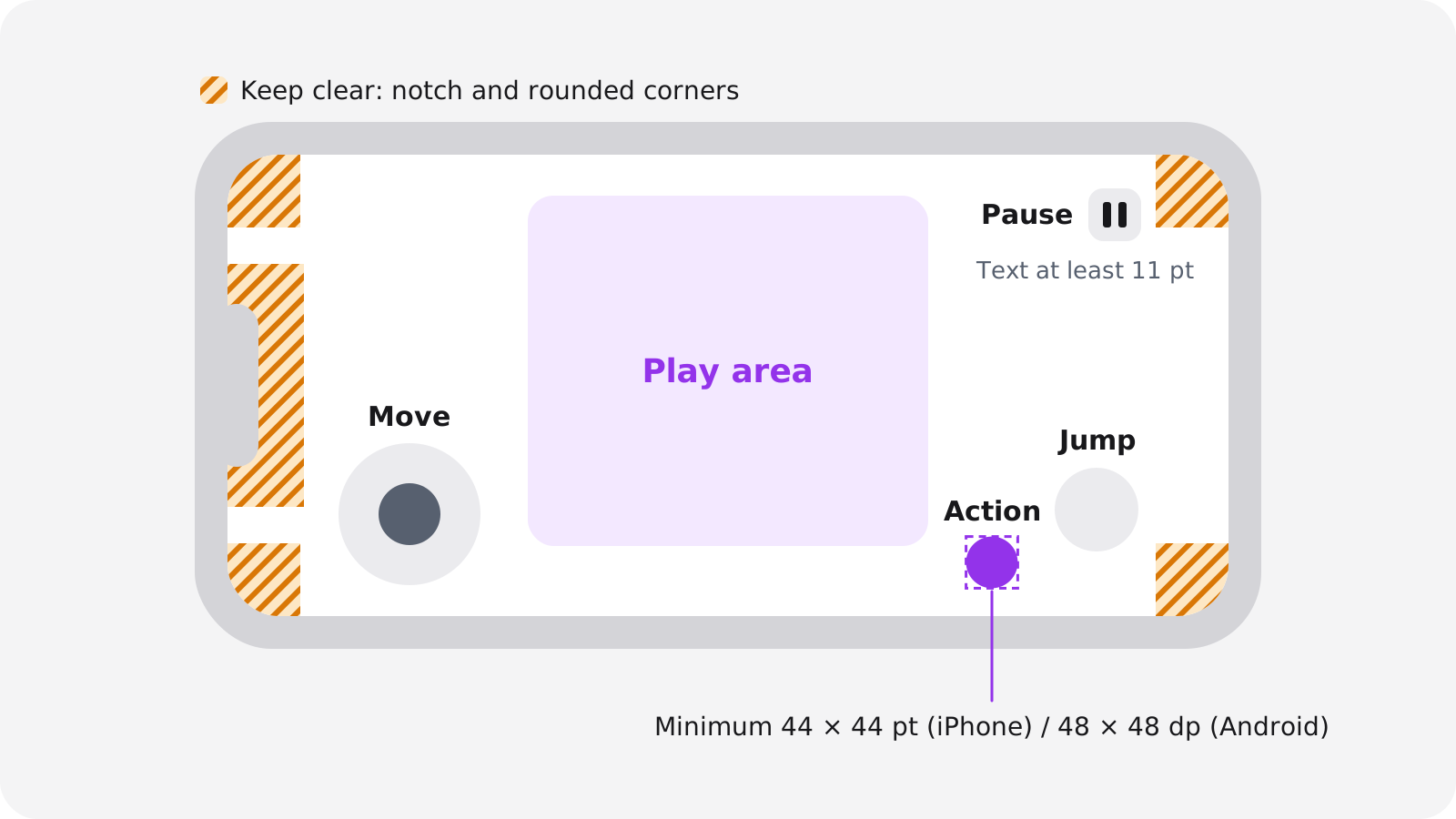
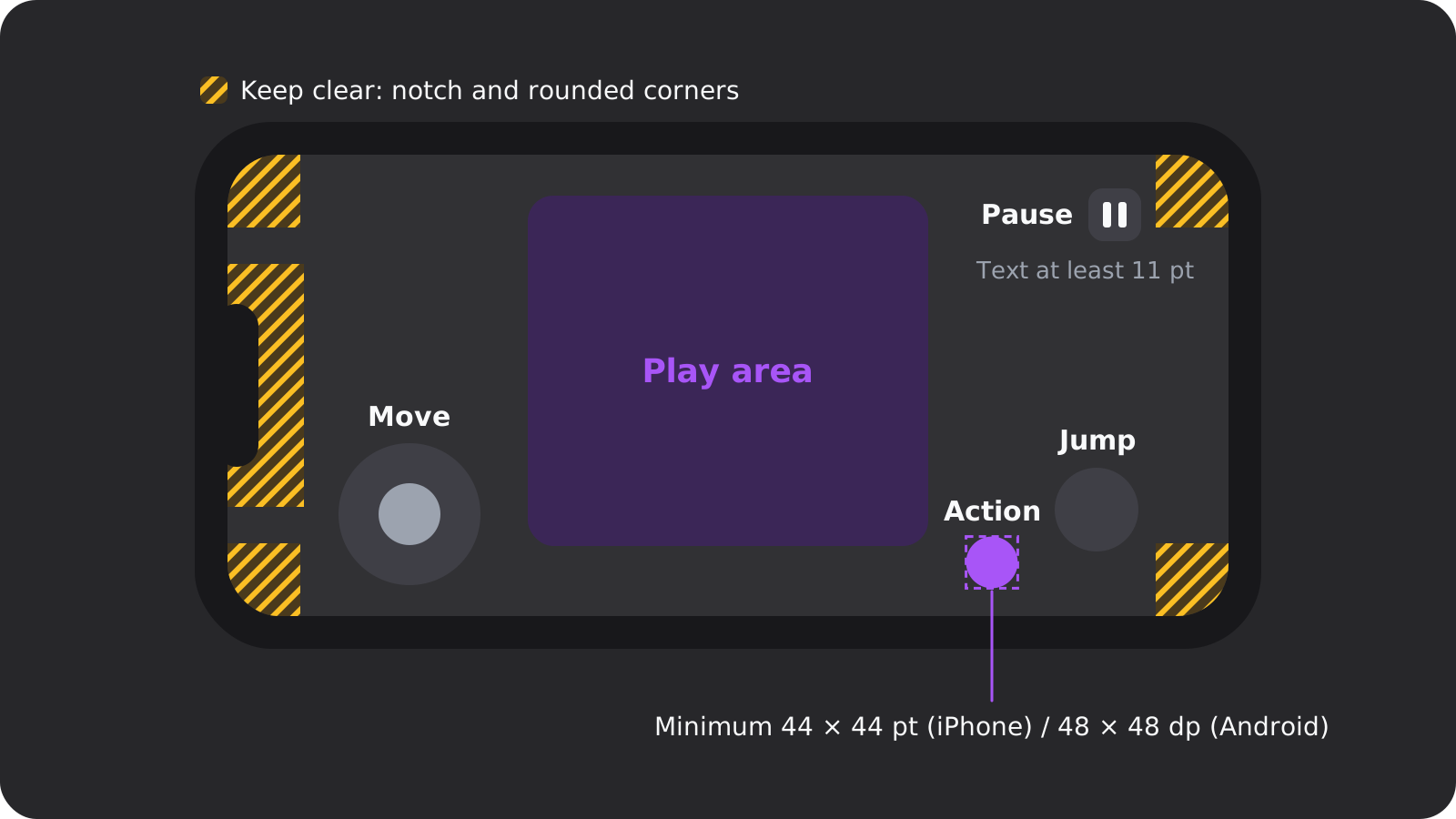
Apple's design tips ask for controls of at least 44 × 44 points and text of at least 11 points. Android recommends touch targets of at least 48 × 48 dp. Put the controls in the bottom corners, keep the notch and rounded corners clear, and leave the middle of the screen to the game.
Test on Android and iPhone
On Android, install over USB or use Google Play's internal testing track, which takes up to 100 testers and is available within minutes. Sending friends an APK still works in the US. Since September 30, 2026, though, certified devices in Brazil, Indonesia, Singapore and Thailand require apps from verified developers, and Google plans a global rollout in 2027.
On iPhone, a free Apple Account signed in to Xcode (a "Personal Team") installs on up to 3 devices, but the profiles expire after 7 days, so you reinstall every week (Apple). With the paid membership, TestFlight takes up to 100 internal and 10,000 external testers, and the first external build goes through App Review.
Crashes, battery and size
Play may reduce your game's visibility and show a warning on its listing if it crosses an Android vitals threshold over 28 days, such as a 1.09% crash rate, a 0.47% ANR (app not responding) rate or 1% excessive battery use. Play also warns users about downloads over 200 MB on mobile data (Play size limits). Keep your first game small.
How to publish an Android game on Google Play in 2026
Google Play is cheap to join and slow to clear for newcomers. Here's the path for a new personal account, as of November 2026:
Register and verify ($25 once)
You must be 18 or older, Google may ask for a government ID and a credit card in your legal name, and prepaid cards aren't accepted. Personal accounts also verify an Android device in the Play Console app, while organization accounts need a free D-U-N-S number.
Build an AAB that targets API 36
Uploads must be Android App Bundles, and since August 31, 2026 they must target Android 16 (API level 36). More on this below.
Fill in Data safety and the content rating
Every app needs a Data safety form and a privacy policy, even if it collects nothing, and you answer for your ad and analytics SDKs too. It also needs an IARC rating: unrated apps are removed.
Run the closed test: 12 testers, 14 days
Opt in at least 12 testers and keep them opted in for 14 consecutive days.
Apply for production
On the Dashboard, choose Apply for production and answer three groups of questions about your test, your game and its readiness.
Wait for review
Google says some accounts wait up to seven days, or longer in exceptional cases.
The 12-tester, 14-day rule
This is the rule that catches first-timers. If your personal account was created after November 13, 2023, you must run a closed test with at least 12 testers who stay opted in for 14 consecutive days. The rule was still in force when we checked in November 2026. The production application then asks how recruiting went, what feedback you got and what you changed, who the game is for, what makes it unique, and how many installs you expect in the first year.
So recruit testers before the game is finished: friends, a Discord server, the players of your web build. Recruit more than 12, because the rule counts people who stayed opted in the whole time and one drop-out can cost you days. Plan on two to three weeks from your first closed-test build to a public launch.
Target API 36 and your engine
Since August 31, 2026, new apps and app updates must target Android 16 (API level 36) to be submitted. Extensions ran only to November 1, 2026, so from this month the rule applies to everyone.
Uploads have had to be AABs since August 2021. In Godot, that means a Gradle build and a release keystore, and the Godot 4.7 Android docs still list the API 35 SDK in their setup steps. Whatever engine or tool made your bundle, check that its target SDK says 36 or higher before you upload.
How to publish an iPhone game on the App Store in 2026
Apple has no tester rule. You get the Mac requirement, more privacy paperwork and a review of every submission instead.
Account and build tools
The Apple Developer Program costs $99 per membership year. You need an Apple Account with two-factor authentication and your legal name; a parent or guardian can enroll for a minor, and organizations need a D-U-N-S number. Since April 28, 2026, uploads must be built with Xcode 26 and the iOS 26 SDK, and since September 9, 2026, apps must target iOS 13 or later. Engine docs lag behind: Unity 6.6's manual still recommends Xcode 16 or later, but App Store Connect goes by Apple's rule.
Privacy and age ratings
- Privacy labels: to submit a new app or an update, you describe your privacy practices in App Store Connect.
- Privacy manifests: since May 1, 2024, apps must give approved reasons for certain APIs, including inside SDKs. Apple's SDK list includes UnityFramework, Flutter and Firebase.
- App Tracking Transparency: linking your game's data with other companies' data for targeted ads or ad measurement needs the player's permission. Without it, the advertising identifier comes back as all zeros.
- Age ratings: Apple's new tiers add 13+, 16+ and 18+ to 4+ and 9+, and developers had to answer the new questionnaire by January 31, 2026 to keep submitting updates.
App Review and the rejections that hit first games
As of November 2026, Apple's App Review page says it typically reviews at least 50% of submissions in under 24 hours and 90% in under 48 hours. Older, faster figures still circulate, but that's the current wording. The same page says more than 40% of unresolved issues come from guideline 2.1, App Completeness: crashes, placeholder content and incomplete information.
The App Review Guidelines that matter most for a first game:
- 2.1: submit the final version, with placeholder text and temporary content removed.
- 4.1(a) and 4.3(b): don't copy the latest popular app, and don't submit something indistinguishable from what's already widely available. A tutorial project with new colors is exactly that.
- 4.2.6: apps made from a commercialized template or an app generation service are rejected unless the provider of the app's content submits them. If a template, an AI tool or a hired developer helped, submit from your own developer account, with content that's yours.
- 3.1.1: loot boxes must disclose the odds before purchase.
Google Play and the App Store side by side
| Rule (Nov 2026) | Google Play | App Store |
|---|---|---|
| Developer fee | $25 once | $99 a year |
| Gate for newcomers | Closed test, 12 testers, 14 days (personal accounts since Nov 13, 2023) | None |
| Build tools | Any computer; upload an AAB | Mac with Xcode 26 (since Apr 28, 2026) |
| Platform rule | Target API 36 (since Aug 31, 2026) | iOS 26 SDK; target iOS 13+ (since Sep 9, 2026) |
| Free test on your phone | USB install or internal track | Personal Team: 3 devices, 7-day installs |
| Beta testing | Internal (100), closed, open | TestFlight: 100 internal, 10,000 external |
| Privacy | Data safety form, privacy policy | Privacy labels, privacy manifests, ATT |
| Age rating | IARC questionnaire | 4+, 9+, 13+, 16+, 18+ |
| Review time | Up to 7 days or longer for some accounts | 50% under 24 h, 90% under 48 h |
| Size limit | 500 MB base module, compressed | 4 GB uncompressed |
| Fee under $1M a year | 10% plus 5% billing (US, EEA, UK) | 15% (Small Business Program) |
Skip the stores: publish a mobile web game
A web build plays from a link in any phone browser. There's no developer fee, no review and no 14-day test, and an update is live the moment you upload it. For a first game, it's the cheapest way to find out whether anyone cares.
Godot's web export works on iPhone, but its docs list the costs: web builds run slower on phones than native ones, browsers need a tap before they play audio, and Godot 4 projects written in C# can't be exported to the web yet.
- Poki says it has 100 million monthly players. You submit a browser build it can open without a login, and its revenue share isn't published.
- CrazyGames offers a Basic Launch of 7 to 21 days with monetization off, and a Full Launch for selected games. Its phone limits are strict: an initial download of 20 MB or less to be eligible for the mobile homepage, and gameplay within 20 seconds. Its revenue share isn't published either.
- Your own site or itch.io, where you control the page but bring your own players.
To make it feel like an app, iPhone players can tap Share and then Add to Home Screen in Safari. If your web manifest sets the display mode to standalone or fullscreen, the game opens like an app (WebKit). Godot's web export has a PWA option for the icon, orientation and offline loading.
Why the web route works
- $0 to publish, no review, no tester rule
- One link plays on iPhone and Android
- Updates go live instantly
- A ready-made pool of Google Play testers later
Cons
- Slower than a native build, and audio waits for a tap
- No store search or store features
- Portal revenue shares aren't published
- Tight size budgets on portals' mobile pages
How much does it cost to make a mobile game?
In cash, between $0 and about $124 for the first year. The engines are free, Google charges $25 once, Apple charges $99 a year, and the real cost is your time. As of November 2026:
| Item | Web only | Android | Both stores |
|---|---|---|---|
| Engine | $0 (Godot, Defold, Unity Personal) | $0, or $99.99 once for GameMaker if you sell | Same as Android |
| Developer account | $0 | $25 once | $25 once plus $99 a year |
| Hardware | Your computer and phone | Any computer and an Android phone | A Mac or a cloud Mac, plus an iPhone |
| Testers | Friends | 12 testers for 14 days | The 12, plus TestFlight testers |
| Art and sound | Free CC0 asset packs | Free CC0 asset packs | Free CC0 asset packs |
| Cash in year one | $0 | $25 | $124 plus Mac access |
What Apple and Google take from each sale
On a $100 in-app purchase from a US player, a developer earning under $1 million a year keeps about $85 with either store's built-in billing.
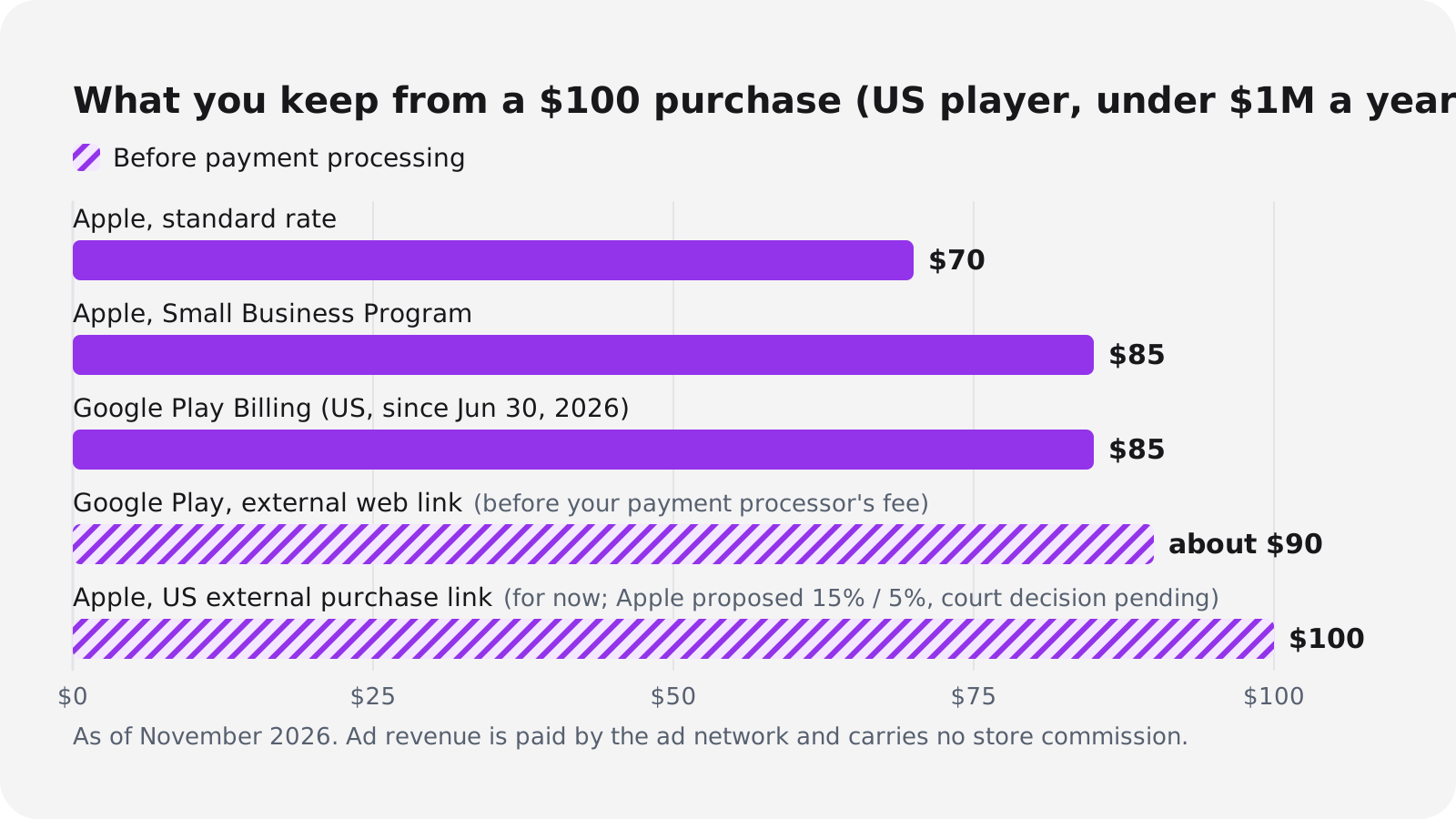
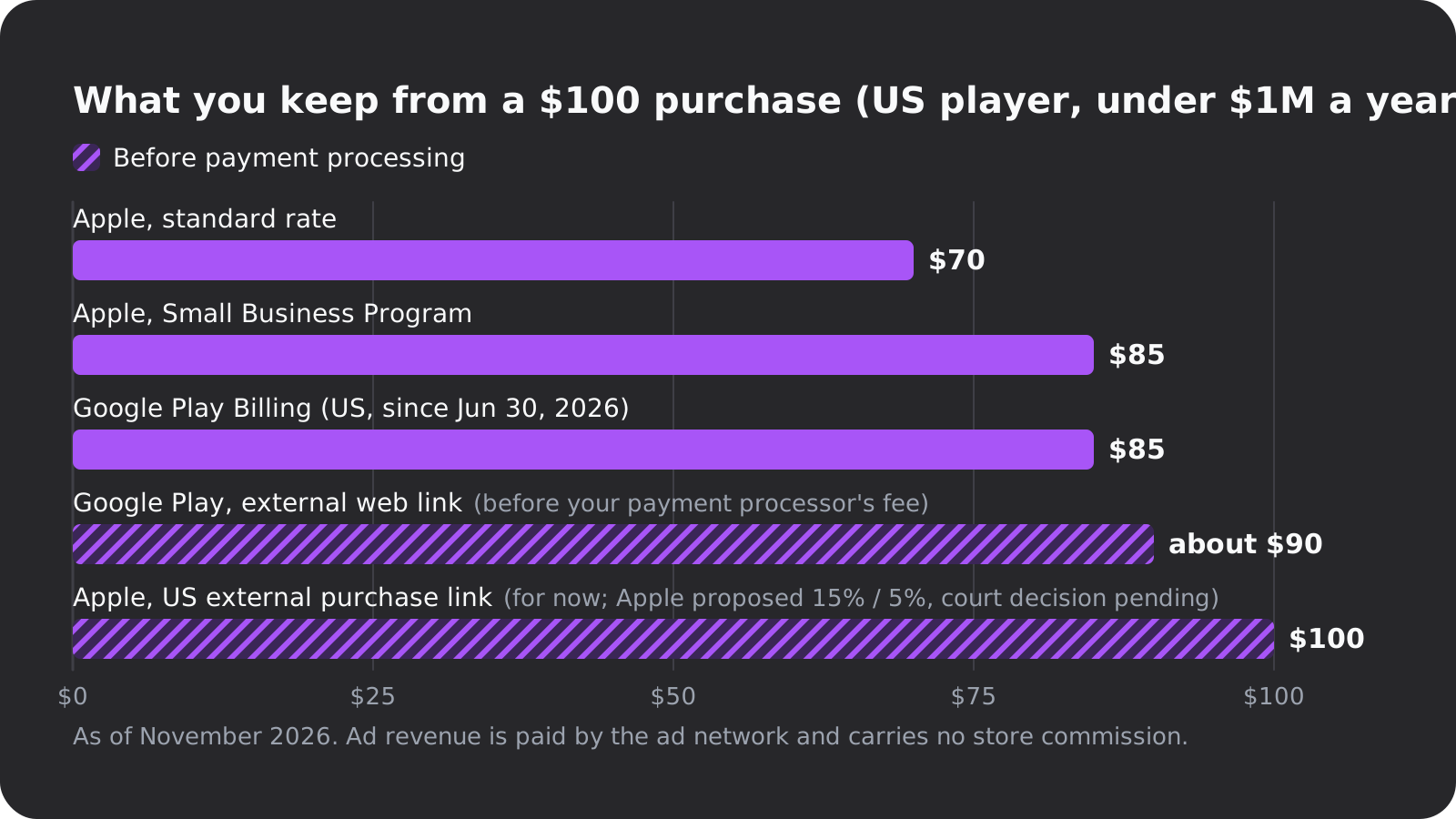
- Apple charges 30% as standard. Its Small Business Program, running since January 2021, cuts that to 15% if you earned up to $1 million in the previous calendar year. New developers qualify, but you have to enroll.
- Google Play in the US, EEA and UK switched on June 30, 2026 to a 10% service fee on your first $1 million in annual earnings, plus a 5% billing fee only when you use Google Play Billing (Android Developers Blog, June 24, 2026). Subscriptions pay the same 10%, and the rate is higher above $1 million. Australia and Japan moved on September 30, 2026, and most other regions keep the older 15% and 30% until the rollout reaches them by September 30, 2027.
- Payments outside the store: Google's external web links skip the billing fee but not the service fee, so you keep about $90 before your own payment processor's cut. US iOS apps may link to outside purchases, and after an April 2025 ruling in Epic v. Apple, Apple currently takes nothing on them. In August 2026 Apple asked the court to allow 15%, or 5% for small developers (iPhone in Canada, August 14, 2026). Treat that 0% as temporary.
- Ads: the ad network pays you directly, so neither store takes a cut.
How mobile games make money, and how long they take
Games earn from in-app purchases, ads, a price up front, subscriptions and season passes, or a mix. In-app purchases are the biggest pool: Sensor Tower puts mobile game purchase revenue at $82 billion in 2025. The famous examples are outliers, not forecasts, but they show both money and time:
- Flappy Bird took two to three days and earned around $50,000 a day from ads in early 2014.
- Crossy Road took about 12 weeks and, with coins, ads and purchases, made over $10 million within three months of its November 2014 release.
- Monument Valley, a paid game, took 10 months and $1.4 million, earned that back within two weeks of its April 2014 launch, and passed $14 million by May 2016 (Wikipedia).
Helpshift's guide puts a basic solo game at a few weeks to a few months; a new Google Play account adds two to three weeks. If you add ads, budget time for the paperwork too: the tracking prompt on iOS and the ad SDK's data in your Data safety form.
How to make a mobile game with AI
This is where Oryn fits, so here's what it does and what it doesn't. Oryn is an AI game maker for people who don't write code. You describe the game, Oryn asks planning questions one at a time, writes a game design document for you to approve, and then builds a real Godot project and a playable web build. The build button reads about 30 minutes, so it isn't instant.
For a phone game, choose Mobile Game in the composer. That sets the main screen shape and control scheme, though every Oryn game stays playable with keyboard, gamepad and touch. Games are landscape by default, and the planner can switch one to portrait. The guide on deciding mobile or desktop before you build explains the trade-off.
- Touch controls come with every game, and you can open a private build on your phone by signing in there with the same account.
- A public game page on the Oryn games shelf plays in the phone browser with no download and no account. On iPhone, Add to Home Screen gives true fullscreen.
- One honest limit: 3D games in Safari and on phones run with simpler graphics.
For the stores, export the project. The full Godot project downloads as a .zip and opens in Godot with no proprietary format (Oryn projects currently use Godot 4.6.3), and exports aren't locked behind a paid plan. From there you build the Android bundle and the iOS Xcode project like any Godot developer, so you set the target API level and do the signing yourself. Oryn doesn't hold your store accounts and doesn't submit anything for you. The guide to exporting the Godot project walks through it.
Before you submit an AI-built game, get two things right:
- Your own account, original content. Guideline 4.2.6 rejects apps from app generation services unless the content provider submits them, and 4.3 rejects look-alikes. Make the game distinctly yours.
- The credits. Every Oryn game includes a CREDITS.md listing the engine, the asset sources and what shipping requires, including the Godot MIT notice. Some of the models that generate art and audio need a commercial-use check, so read the file before you sell.
On the free plan you can design up to three games, and your first game is built free. Changing it afterwards, or building another, needs a paid plan (Oryn pricing). You need to be 18 or older to use Oryn.
Whatever tool you choose, do two things this week: get a gray-box version of your one mechanic running on your own phone, and start a list of 12 people who would play it for two weeks. When the game is ready, your Google Play test can start the same day.
Frequently asked questions
How much does it cost to make a mobile game?
In cash, $0 to about $124 for the first year, as of November 2026. Engines like Godot, Defold and Unity Personal are free, Google Play charges $25 once and the App Store $99 a year, and iOS builds need a Mac or a cloud Mac.
Can I make a mobile game for free?
Yes. Build with a free engine, test on your own Android phone or on your iPhone with a free Apple Account (installs expire after 7 days), and publish it as a web game that plays in phone browsers. Only the app stores charge a fee.
Do I need a Mac to make an iPhone game?
For the App Store upload, yes: since April 28, 2026, builds must come from Xcode 26, which runs only on macOS. You can design and test on any computer and use a cloud Mac, such as Codemagic with 500 free minutes a month, for the final build.
Why does Google Play ask for 12 testers?
Personal developer accounts created after November 13, 2023 must run a closed test with at least 12 testers opted in for 14 consecutive days before they can apply for production. Recruit testers before your game is finished so the test doesn't delay your launch.
How long does it take to make a mobile game?
A one-mechanic game can take days to a few months: Flappy Bird took two to three days and Crossy Road about 12 weeks, while the polished Monument Valley took 10 months. A new Google Play account adds two to three weeks for its closed test and review.
What is the best engine for mobile games?
For a free, light engine you code in, Godot. Unity, which says it's behind over 70% of the top 1,000 mobile games, is free under $200,000 in revenue or funding, Defold is built for small downloads, and GDevelop or Construct suit people who don't want to code.
Can I make a game on my phone?
Only partly. Godot's official Android editor is experimental and works best with a keyboard and mouse, and Roblox Studio runs only on Windows and Mac. You can play and test browser builds on your phone, including private Oryn builds when you sign in there with the same account.
How do mobile games make money?
Through in-app purchases, ads, a price up front, subscriptions or passes, or a mix. Under $1 million a year, Apple takes 15% through its Small Business Program and Google Play takes 10% plus a 5% billing fee in the US, EEA and UK, so you keep about $85 of every $100.