To make a platformer, pick a 2D engine, build one character that runs and jumps, tune that jump until it feels right, then design a handful of short levels around a single idea and test them on other people. The engine matters less than you'd think. The jump matters more than anything, and it comes down to a few numbers you can copy from games that got it right.
This guide uses the real ones: Celeste's player code is public, so the values below come from its source file, not a forum post.
Choose a platformer game maker
Every tool below can make a good 2D platformer. They differ in whether you write code, what it costs to sell the result, and how much platformer logic comes built in. Prices are as of November 2026.
Free · MIT licence
Godot 4.7
- Our pick for a first platformer
- CharacterBody2D and TileMapLayer built in
- No revenue cap, no royalties
$99.99 once to sell
GameMaker
- Made for 2D
- Free tier is non-commercial
- Behind Katana Zero and Pizza Tower
No code · free under $50K a year
GDevelop
- Platformer behavior out of the box
- Coyote time, wall jump and dash via an extension
Describe it instead
An AI game maker
- Playable start from a prompt
- Check that you can export the project
- Oryn exports the full Godot project
| Tool | How you build | Price | Can you sell the game? | Best for |
|---|---|---|---|---|
| Godot 4.7.2 | GDScript or C# | Free, MIT | Yes, no royalties | Learning a real engine for free |
| GameMaker | GML code or GML Visual | Free tier; Professional $99.99 once | Professional or higher | 2D-only projects |
| GDevelop | No-code events | Free plan; paid tiers | Free plan, under $50K a year | No-code beginners |
| Construct 3 | No-code event sheets in the browser | Free edition (50 events); paid plans | Paid plans only | Classrooms, browser games |
| Unity 6 | C# | Personal free up to $200K a year | Yes | A studio career |
| Scratch, MakeCode Arcade | Blocks | Free | n/a | First steps |
| Super Mario Maker 2 | Course editor | $59.99 on Switch | No, courses only | Practicing level design |
| Oryn | Describe it in chat; edit the Godot files if you want | Free plan; paid plans | Yes; check third-party asset licences | A playable Godot project from a description |
Godot is our pick: free under the MIT licence, at version 4.7.2 since August 2026, with CharacterBody2D and TileMapLayer built in. Oryn builds Godot projects, so we're not neutral; our Godot vs Unity comparison lays out the trade-offs. GameMaker's free tier is non-commercial, and selling needs the $99.99 Professional licence (GameMaker pricing). Its platformer tutorial is clear, but it only lets the player jump while touching the ground, with no coyote time or buffer.
GDevelop's Platformer character behavior handles acceleration, jump sustain, one-way platforms and ladders without code, and its free plan allows commercial use for individuals and small businesses under $50K a year (GDevelop pricing). Construct 3 has a built-in Platform behavior, but its free edition stops at 50 events and rules out commercial use (Construct pricing). Unity 6 Personal is free up to $200,000 a year in revenue and funding (Unity), but it's more tool than a first platformer needs.
If you're on Scratch, griffpatch's Code a Platformer Game series leads Google's results for this search, and the jump advice below applies there too. Super Mario Maker 2 ($59.99, Nintendo) is good level-design practice, but your courses stay inside the game. Platform Game Maker, which Google's AI Overview suggests, hasn't had a developer update in over three years per its Steam page.
SoonLab's platformer maker turns a prompt into a browser platformer, but its page doesn't say which engine it uses or whether you can export. Oryn writes a Godot project you can export (more near the end). Our roundup of the best AI game makers compares the rest, and Godot MCP covers having an assistant drive your own Godot editor.
The engines behind famous platformers
| Game | Year | Developer | Engine |
|---|---|---|---|
| Spelunky (original) | 2008 | Derek Yu | GameMaker |
| Super Meat Boy | 2010 | Team Meat | Custom engine by Tommy Refenes |
| Hollow Knight | 2017 | Team Cherry | Unity (started in Stencyl) |
| Cuphead | 2017 | Studio MDHR | Unity (moved from XNA in 2014) |
| Celeste | 2018 | Maddy Makes Games | XNA, C#, Monocle engine |
| Katana Zero | 2019 | Askiisoft | GameMaker Studio 2 |
| Pizza Tower | 2023 | Tour De Pizza | GameMaker |
| Animal Well | 2024 | Billy Basso | Custom C++, about seven years solo |
| Hollow Knight: Silksong | 2025 | Team Cherry | Unity 6 (Unity case study) |
Celeste, Hollow Knight, Pizza Tower and Animal Well run on four different technologies, so pick the tool you'll finish a game in. For Godot examples, see our list of games made with Godot.
Plan a platformer you can finish
Keep the first one small. Every extra move multiplies the level ideas you need and the bugs you'll chase, so settle four things before you open the engine:
- One move beyond run and jump: a dash, a wall jump, a double jump, or one gimmick such as crumbling platforms.
- 5 to 10 short levels. A level that takes a minute to beat is plenty. The range is our suggestion, not a rule.
- One art pack and one tile size. Mixed packs make a game look unfinished.
- A base resolution. Celeste renders at 320×180 with 8 px tiles (Maddy Thorson, Celeste & Forgiveness); GameMaker's tutorial uses 320×180 with a 16 px grid.
Start in 2D. A 3D platformer adds a camera you have to design and depth that players misjudge; if you're set on it, read how to make a 3D game first. Small can carry a whole idea: Celeste began as a PICO-8 game built in a few days in 2015 and shipped in full in January 2018 (Wikipedia).
With that scope, a first platformer is a weekend-to-a-month project (our estimate, not a measured average). Write the plan on one page, like a one-page game design document. If this is your first game of any kind, how to make a video game covers the steps around this one.
Make the jump feel good: Celeste's real numbers
Game feel in a platformer is mostly the jump, and Celeste is the usual reference. You don't have to guess its numbers: the developers published the player code under the MIT licence in Noel Berry's NoelFB/Celeste repository. The numbers in this section come from Source/Player/Player.cs (checked November 1, 2026), in pixels and seconds at 320×180 with 8 px tiles.
Celeste's movement constants
| Constant | Value | What the code does with it |
|---|---|---|
Gravity | 900 px/s² | Pulls the player down every frame in the air |
HalfGravThreshold | 40 px/s | Below this vertical speed, gravity halves while jump is held |
MaxFall | 160 px/s | Top fall speed; holding down raises it to 240 |
MaxRun | 90 px/s | Top run speed, about 11 tiles a second |
RunAccel | 1,000 px/s² | Speeding up, and stopping with no input |
RunReduce | 400 px/s² | Easing back down when you're above top speed |
AirMult | 0.65 | Multiplies acceleration in the air |
JumpSpeed | 105 px/s upward | Initial jump speed (−105 in code, where up is negative) |
JumpHBoost | 40 px/s | Extra horizontal speed when you jump while holding a direction |
VarJumpTime | 0.2 s | How long holding jump keeps the upward speed |
JumpGraceTime | 0.1 s | Coyote time |
UpwardCornerCorrection | 4 px | How far you get nudged around a ceiling corner |
Design the jump from a height and a time
Don't guess at gravity. Choose two numbers a level designer understands, how high the jump goes (h) and how long it takes to reach the top (tₕ), and let projectile motion give you the rest (GDQuest's kinematic jump formulas, updated August 2026):
- jump speed: v₀ = 2h / tₕ
- gravity: g = 2h / tₕ²
- fall gravity, for a different time to fall back down (t_fall): g_fall = 2h / t_fall²
Say you want a jump of 3.5 tiles at 16 px (h = 56 px) that peaks after 0.35 s. Then v₀ = 2 × 56 / 0.35 = 320 px/s and g = 2 × 56 / 0.35² ≈ 914 px/s². In Godot, where y points down, the jump speed is −320.
Kyle Pittman's GDC 2016 talk, Math for Game Programmers: Building a Better Jump, builds jumps the same way from a target height and distance. To design by distance, substitute tₕ = xₕ / vₓ, where xₕ is the run distance to the apex at speed vₓ: v₀ = 2h·vₓ / xₕ and g = 2h·vₓ² / xₕ².
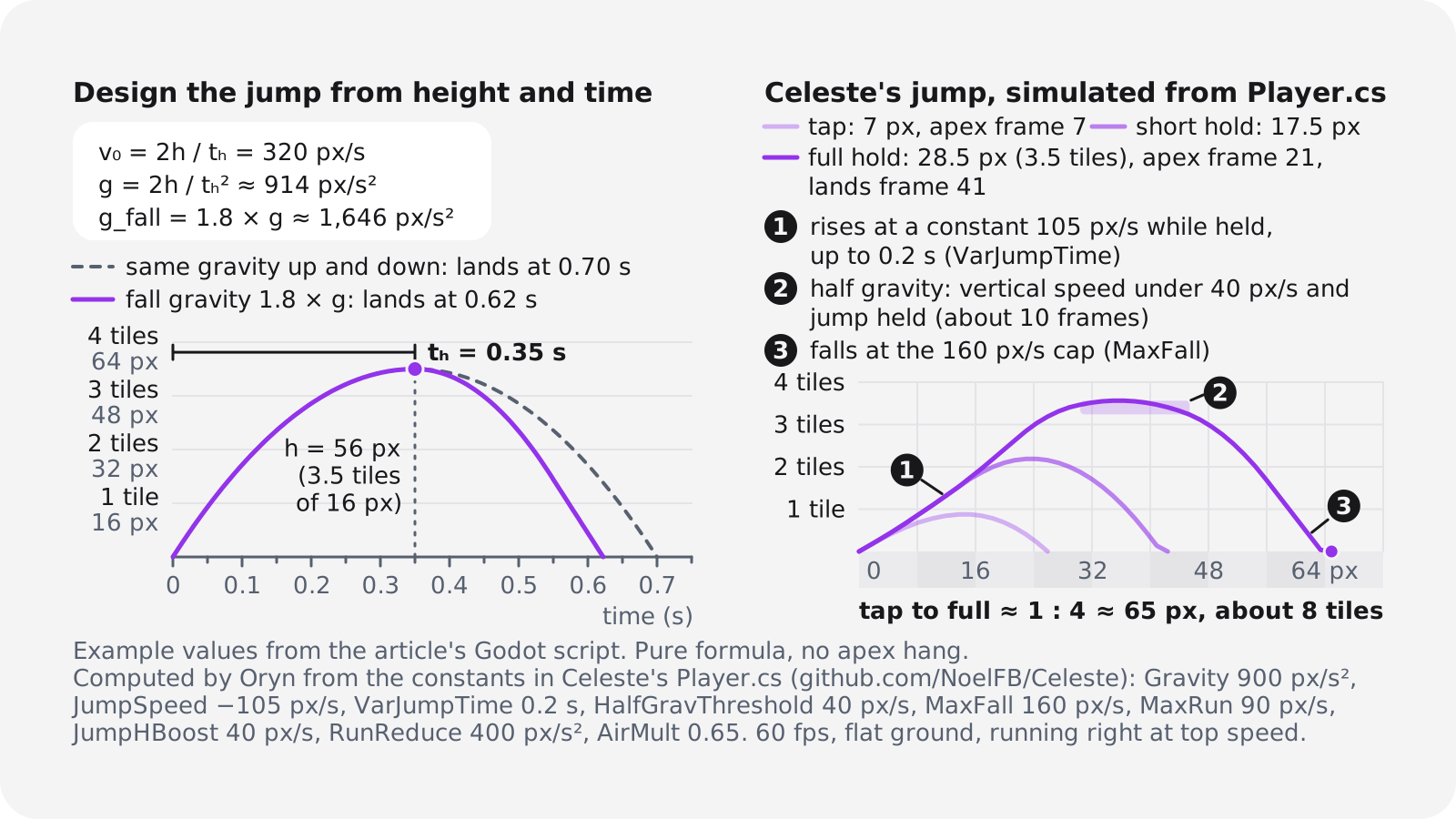
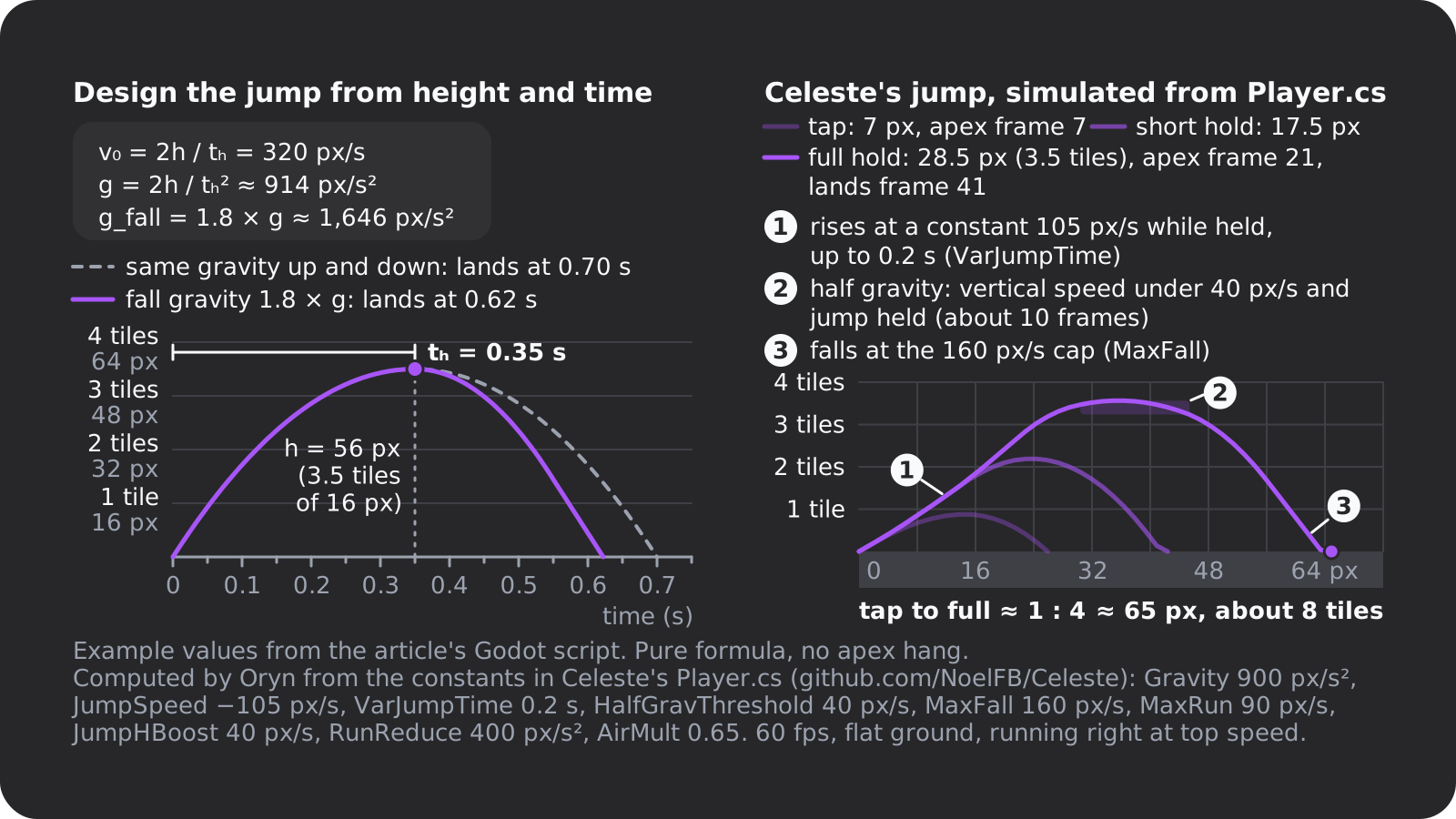
Celeste doesn't derive its gravity this way. Its jump sets upward speed to 105 px/s and keeps it there while you hold the button, for up to 0.2 s, before gravity takes over. We ran those constants through a 60 fps simulation; these results are Oryn's calculation, not figures the developers published:
- Tap: about 7 px, under 1 tile, peaking at frame 7.
- Short hold (about 0.1 s): about 17 px, a little over 2 tiles.
- Full hold: about 28.5 px, roughly 3.5 tiles, peaking at frame 21 and landing at frame 41 (0.68 s). At full run it covers about 65 px, roughly 8 tiles.
That's about 1:4 between a tap and a full jump. Write down your own version of these numbers before you build levels, because every gap and ledge depends on them.
Run, stop and steer in the air
Celeste reaches its 90 px/s top speed in 0.09 s, about 5 frames, and stops just as fast. In the air, acceleration drops to 0.65 times that, so the same change takes about 0.14 s (8 frames): you can steer, but you can't turn on a dime. Above top speed, for example right after the 40 px/s jump boost, it eases back at only 400 px/s², which is why momentum carries through a jump.
Change speed in pixels per second times the frame time. A per-frame multiplier, like the 0.8 to 0.9 that Google's AI Overview suggests for this search, ties your physics to the frame rate. And give the ground some acceleration: Godot's CharacterBody2D example sets speed instantly, which feels stiff. Three to six frames to top speed is a good start.
Variable jump height
A tap should give a hop and a hold a full jump. There are two common ways to build it:
- Sustain (Celeste): while the button is held, upward speed stays at the jump speed for up to 0.2 s. Let go and gravity starts at once. A head bump ends the sustain too, unless it happens in the first 0.05 s.
- Cut (most tutorials): jump at full speed, and when the player lets go while still rising, cut the upward speed, for example in half. Halving the speed quarters the remaining height.
Super Mario Bros. teaches this without a word: World 1-1's four pipes rise in height, so you learn to hold the button longer (Wikipedia's World 1-1 article, citing Eurogamer's 2015 Miyamoto interview).
Apex hang and falling faster than you rise
Celeste halves gravity near the top of the jump, but only while you hold the button: once vertical speed drops under 40 px/s, gravity falls to 450 px/s². In our simulation of a full jump, that's about 10 frames, a sixth of a second, inside the top 3 px of the arc, which gives you time to line up the landing. Thorson's Celeste & Forgiveness calls it the Halved-Gravity Jump Peak.
On the way down, Celeste doesn't raise gravity; it caps the fall at 160 px/s, about 1.5 times the jump speed, or 240 px/s if you hold down. Many games go further. Steve Swink's book Game Feel, as quoted in a 2024 summary of Pittman's method, says Mario's gravity triples after the apex, which makes the jump feel heavy instead of floaty. If your jump floats, change this first: we'd start fall gravity at 1.5 to 2.5 times the rise gravity, with a top fall speed.
Coyote time
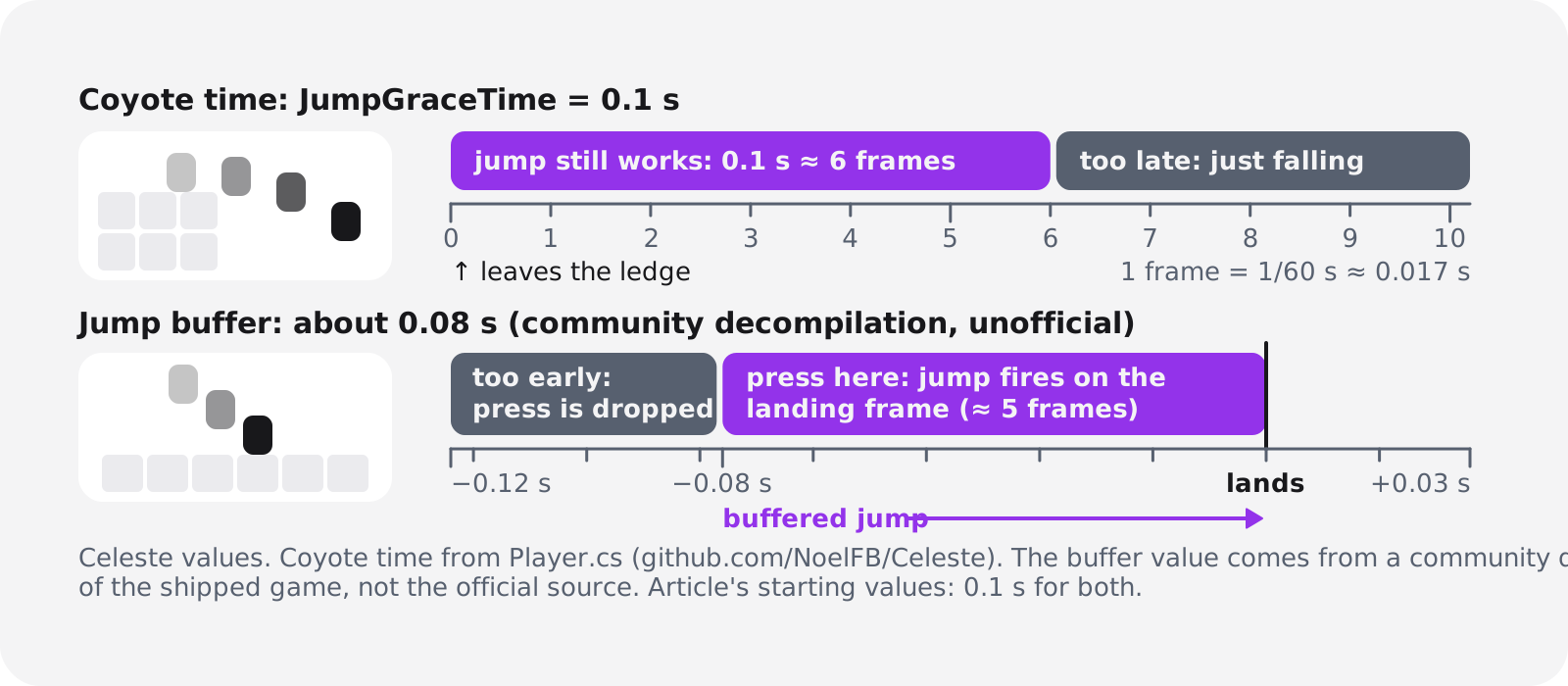
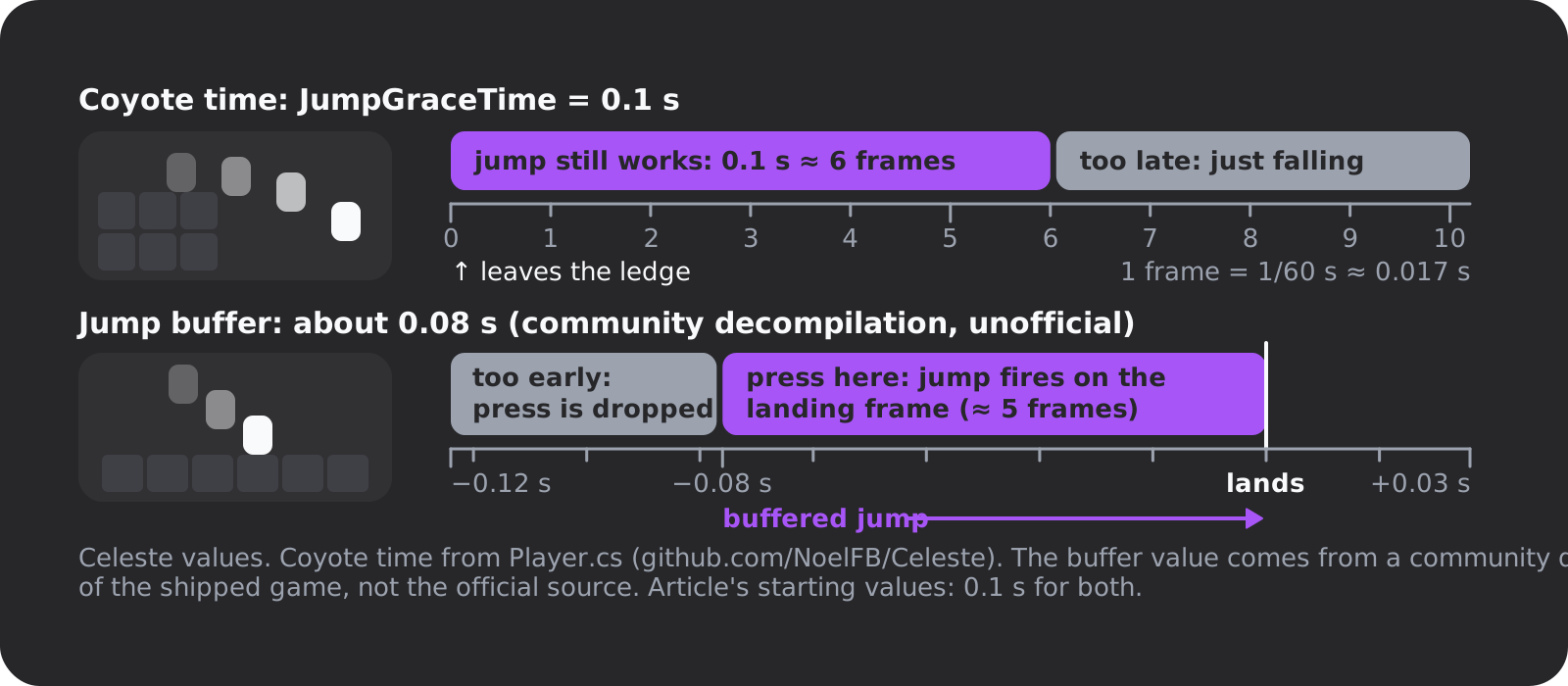
Coyote time is a short window after you run off a ledge in which a jump still works. Celeste's is JumpGraceTime, 0.1 s, or 6 frames at 60 fps. The code resets the timer to 0.1 on every frame you stand on the ground, counts it down in the air, and accepts a jump while it's above zero.
Without it, players press jump a frame or two after leaving the ledge, fall, and swear the game ate their input. Start at 0.1 s and stay between 0.06 and 0.15 s (our range); much longer and players notice they're jumping off thin air.
Jump buffering
Jump buffering is the mirror image: a jump pressed slightly before landing fires on the landing frame instead of being dropped. Celeste's input code isn't in the public repository, so its window comes from a community decompilation of the shipped game: about 0.08 s, or 5 frames. Treat that as unofficial, and start yours at 0.1 s.
Corner correction and the rest of the invisible help
When you jump into the corner of a ceiling, Celeste tries shifting you up to 4 px sideways (UpwardCornerCorrection) and carries on if that space is free. At 8 px tiles that's half a tile, so a jump that clips a corner by a pixel still makes it. Dashes get the same 4 px treatment.
Thorson's article lists ten of these forgiveness mechanics, among them coyote time, jump buffering, keeping a moving platform's momentum for a few frames, and a wall jump that works a few pixels from the wall (2 px in the article, 3 in the code's WallJumpCheckDist). Thorson notes the team didn't invent any of them; the point, in the article's words, is a game that "wants you to succeed".
Starting values
The Celeste column comes from the source code or our simulation of it. The right-hand column is our editorial recommendation: a place to start tuning, not an industry standard.
| Technique | Celeste | Our starting value |
|---|---|---|
| Coyote time | 0.1 s (6 frames) | 0.1 s; try 0.06 to 0.15 |
| Jump buffer | About 0.08 s (unofficial) | 0.1 s; try 0.05 to 0.15 |
| Jump height | About 3.5 tiles (computed) | 3 to 4 tiles |
| Time to apex | About 0.35 s (computed) | 0.35 to 0.45 s |
| Variable jump | Hold sustains speed up to 0.2 s | Sustain 0.15 to 0.25 s, or halve speed on release |
| Apex hang | Half gravity under 40 px/s while held | The same |
| Falling | Capped at 160 px/s, 240 holding down | Fall gravity 1.5 to 2.5 × rise, plus a cap |
| Ground acceleration | Top speed in 0.09 s (5 frames) | 3 to 6 frames |
| Air control | 0.65 × ground | 0.6 to 0.8 × ground |
| Corner correction | 4 px (half a tile) | 2 to 4 px |
How to make a 2D platformer in Godot 4
Godot 4 has the pieces built in. The player is a CharacterBody2D: you set its velocity, call move_and_slide() inside _physics_process(), and is_on_floor() tells you when it's grounded (Godot docs). Levels are TileMapLayer nodes, one layer each, which replaced TileMap in Godot 4.3 in August 2024. A tutorial that adds a TileMap node is out of date.
Gray-box first
Make a
CharacterBody2Dwith a rectangleCollisionShape2D, and aTileMapLayerwhose TileSet has a physics layer so the tiles collide. No art yet.Set up the input map
Add
jump,move_leftandmove_rightunder Project Settings, Input Map. Keyboard, gamepad and on-screen buttons can all feed the same actions later.Add the controller
Attach the script below to the player. It implements the previous section, with every value in the Inspector.
Build a test room
Lay out gaps from 1 to 5 tiles wide and ledges from 1 to 4 tiles high, so you can see exactly what a tap, a hold and a running jump clear.
Tune, then freeze the numbers
Change values while the game runs (select the player in the Scene dock's Remote tab), write the final numbers down, then start real levels.
extends CharacterBody2D

@export var run_speed := 180.0     # px/s, Celeste's 90 at 16 px tiles
@export var run_accel := 2000.0    # px/s², top speed in 0.09 s
@export var air_mult := 0.65       # less control in the air
@export var jump_height := 56.0    # px, 3.5 tiles of 16 px
@export var time_to_apex := 0.35   # s
@export var fall_mult := 1.8       # fall faster than you rise
@export var max_fall := 320.0      # px/s
@export var coyote_time := 0.1     # s
@export var jump_buffer := 0.1     # s

var coyote_timer := 0.0
var buffer_timer := 0.0

func _physics_process(delta: float) -> void:
	var jump_velocity := -2.0 * jump_height / time_to_apex
	var gravity := 2.0 * jump_height / (time_to_apex * time_to_apex)
	var holding := Input.is_action_pressed("jump")

	coyote_timer = coyote_time if is_on_floor() else coyote_timer - delta
	buffer_timer = jump_buffer if Input.is_action_just_pressed("jump") else buffer_timer - delta

	if not is_on_floor():
		if absf(velocity.y) < 40.0 and holding:
			gravity *= 0.5  # apex hang
		elif velocity.y > 0.0:
			gravity *= fall_mult
		velocity.y = minf(velocity.y + gravity * delta, max_fall)

	if buffer_timer > 0.0 and coyote_timer > 0.0:
		velocity.y = jump_velocity
		buffer_timer = 0.0
		coyote_timer = 0.0
	if velocity.y < 0.0 and not holding:
		velocity.y = maxf(velocity.y, jump_velocity * 0.5)  # let go early: short hop

	var dir := Input.get_axis("move_left", "move_right")
	var accel: float = run_accel if is_on_floor() else run_accel * air_mult
	velocity.x = move_toward(velocity.x, dir * run_speed, accel * delta)
	move_and_slide()
The values scale Celeste's ideas to 16 px tiles and add a fall multiplier Celeste doesn't use. The variable jump is a version of the cut model: while the button is up, upward speed can't exceed half the jump speed, which also shortens a buffered jump the player has already let go of. The apex hang adds a few pixels to the height you set. For corner correction, use test_move() to check whether a spot a few pixels to the side is free.
Platformer level design: teach, test, twist
Good platformer levels teach without text, and two ideas from Nintendo cover most of what a first game needs.
Kishōtenketsu: one idea per level
Koichi Hayashida, director of Super Mario 3D Land, described building each level around one core gameplay idea, structured like a four-panel Japanese comic (Christian Nutt, Gamasutra, April 2012):
- Ki, introduction: show the idea where failing costs nothing.
- Shō, development: use it again in a slightly harder setting.
- Ten, twist: change the situation so the player has to rethink it.
- Ketsu, conclusion: let the player show they've mastered it.
Our example uses crumbling platforms. Teach: one over solid floor, so a fall is harmless. Test: three in a row over a pit. Twist: break one on purpose to drop to a lower path. Finish: a quick climb that uses everything the level taught.
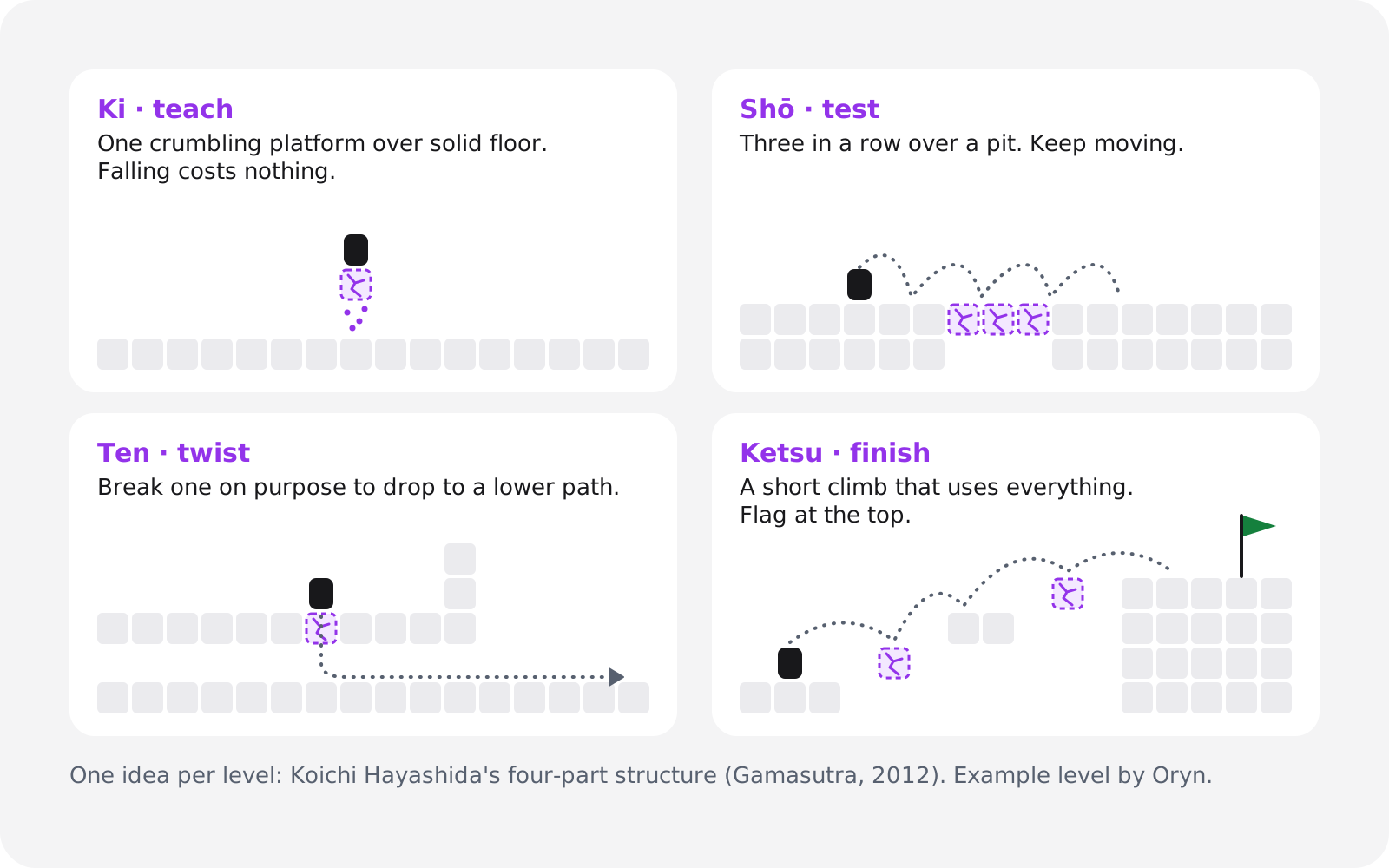
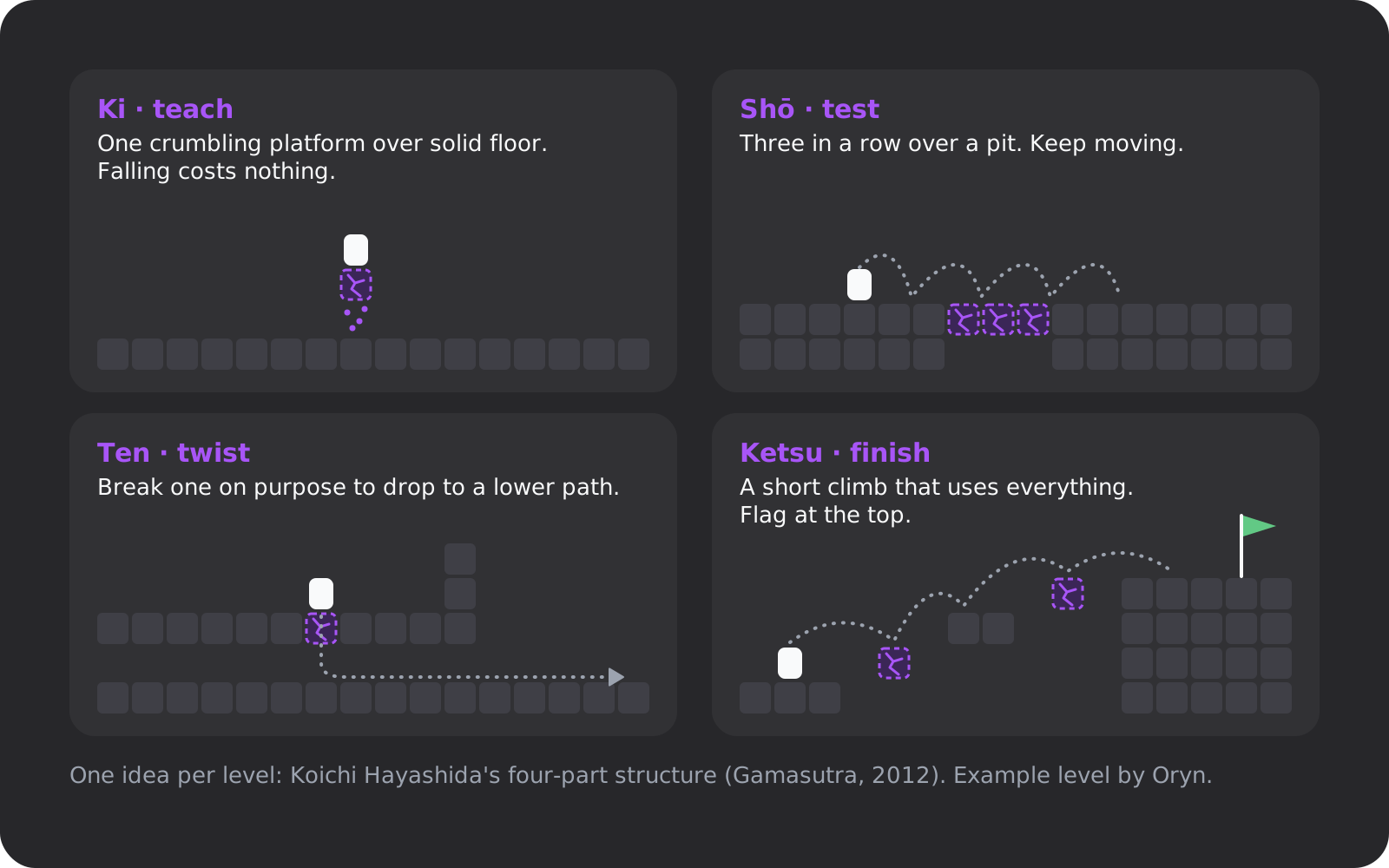
The discipline is in the "one idea" part. Ten levels with one idea each make a game. One level with ten ideas makes a mess.
What World 1-1 teaches without words
Super Mario Bros.' first level, from 1985, is the standard example (Wikipedia):
- The first Goomba can be jumped over, and dying there costs almost no progress.
- The first block gives a coin; the next, a Mushroom that bounces off a pipe and comes back to you.
- Four pipes of rising height teach the held jump.
- Some pits have a floor, so a missed jump isn't always a death.
- Secrets reward replays: a bonus-room pipe, a hidden 1-up and a skip pipe for experts.
Give your level 1 the same job: show the jump, the main hazard and your extra move once each, somewhere failing is cheap.
Checkpoints and fast respawns
Death in a platformer should cost seconds. Respawn instantly, close to where the player died, and keep rooms short so each retry starts near the hard part. A long walk back after every death turns a fun challenge into a chore.
Assist options
Celeste ships an Assist Mode with slower game speed, unlimited dashes and invincibility. It started out as Cheat Mode, and Thorson renamed it because that name felt judgmental (Wikipedia). In a first game, two toggles cover most of it: a game-speed slider (in Godot, Engine.time_scale) and an invincibility switch. Both are cheap to build, and they let more people reach your last level.
Pixel art platformer assets and tools
Kenney's Pixel Platformer has 200 files built on 18×18 px tiles under CC0, so you can use it commercially without giving credit. In Godot, a sheet like that becomes the TileSet your TileMapLayer paints from.
Packs from OpenGameArt and itch.io each carry their own licence: CC0 asks for nothing, CC-BY asks for credit, and many itch.io packs are paid, on terms the creator sets. Read the licence before the first tile goes in, and keep a credits file from day one.
To draw your own:
- Aseprite is a paid sprite editor for pixel art and animation on Windows, macOS and Ubuntu, with a trial version.
- LibreSprite is free under GPL-2.0, forked from Aseprite's last GPLv2 code before Aseprite went proprietary in August 2016.
- Pixelorama is a pixel-art editor built in Godot, listed in Godot's showcase.
Draw at your base resolution and scale up by whole numbers: 320×180 becomes 1280×720 at ×4 and 1920×1080 at ×6, and every pixel stays square. Add juice (jump and landing sounds, a dust puff, a little squash and stretch) only once the movement feels right. Juice can hide a bad jump, but it can't fix one.
Playtest it, then ship it to the browser
Watch three to five people play (our suggestion) without saying a word or touching the controller. Then check:
- Can a new player beat level 1 without reading anything?
- Does every required jump clear with some margin? iD Tech's level design guide lists it too, next to fair enemies and good flow.
- Does a tap give a clearly shorter hop than a hold?
- Is a jump ever lost just after a ledge or just before landing? Check coyote time and the buffer.
- Is the respawn instant and close to the death?
- Does the browser build hold a steady 60 fps?
Ship to the web first. Godot, GameMaker, GDevelop and Construct all export browser builds, and a link people can play in seconds gets you more testers than a download. For phones, put left and right on one side of the screen and jump on the other, make the buttons large, and play in landscape. Glass has no buttons to feel, so coyote time and buffering matter even more. Our guide to making a mobile game covers the rest.
Make a platformer with AI in Oryn
If you'd rather describe the game than write the controller, that's what we build. In Oryn, you write a prompt, answer a few planning questions (one is the art style), and approve a game design document before anything is built. Oryn then writes a real Godot 4 project, with scenes, scripts, input maps, UI and assets, and loads a playable web build in your browser. The build button estimates about 30 minutes.
This article gives you the words to steer it. Put your numbers in the prompt, play the build, and say what feels wrong, one change per message, as our guide to iterating without breaking things recommends. AI output varies between runs, so test each build as you would your own code; every working version is kept and can be restored.
The project is yours. On any plan you can download the editable Godot project as a .zip, or get desktop builds, a signed Android APK and AAB, an Xcode project for iOS or Steam upload scripts; store accounts and submissions stay with you (export guide). Every game stays playable with keyboard, gamepad and touch, and you can publish it to Oryn's public games shelf. The free plan designs up to three games and builds your first one; changing it afterwards needs a paid plan (Oryn pricing).
Whichever route you take, the next step is the same: build the test room, jump across it, and write down how many tiles your jump clears.
Frequently asked questions
How hard is it to make a platformer as a beginner?
It's one of the easier first games to finish: one character, gravity, a jump and tile-based levels. The hard part is the feel, which comes down to a few numbers such as coyote time and fall gravity. Plan on a weekend to a month for one extra move and 5 to 10 short levels (our estimate).
What is the best free engine for a 2D platformer?
Godot 4 is free under the MIT licence, has no revenue cap and includes CharacterBody2D and TileMapLayer for platformers. As of November 2026, GameMaker's free tier is non-commercial (Professional is a one-time $99.99), and GDevelop's free plan allows commercial use under $50K a year.
Can I make a platformer without coding?
Yes. GDevelop's Platformer character behavior and Construct 3's Platform behavior handle movement without code. An AI game maker such as Oryn builds a Godot project from a description that you can play in the browser and export.
What is coyote time in games?
Coyote time is a short grace window after a character runs off a ledge in which a jump still works. Celeste uses 0.1 seconds, 6 frames at 60 fps, set by JumpGraceTime in its public Player.cs source.
What is jump buffering?
Jump buffering remembers a jump pressed just before landing and fires it on the landing frame. A community decompilation of Celeste puts its window at about 0.08 seconds; 0.1 seconds is a good starting value.
How do I make my jump less floaty?
Make the character fall faster than it rises: raise gravity after the apex to 1.5 to 2.5 times the rise gravity, and cap the fall speed. Design the jump from a target height and time to the apex with v₀ = 2h / tₕ and g = 2h / tₕ².
Where can I get free platformer sprites and tilesets?
Kenney's Pixel Platformer has 200 files of 18×18 px tiles under CC0, free for commercial use without credit. OpenGameArt and itch.io packs carry their own licences, so check each one; CC-BY assets need credit.
Can a platformer run in the browser and on phones?
Yes. Godot, GameMaker, GDevelop and Construct all export web builds, and Oryn games run in the browser with keyboard, gamepad and touch. On phones, use landscape, large on-screen buttons and generous coyote time.