Godot MCP means connecting an AI app such as Claude Code, Cursor or Codex to Godot through a small local program called an MCP server. The AI can then run your project, read Godot's errors and edit scenes and scripts. Godot ships no official server. As of November 1, 2026, the most-starred one is Coding-Solo/godot-mcp, the most-starred live-editor bridge is Godot AI, and two paid options, GDAI MCP and Godot MCP Pro, add screenshots and input out of the box.
Everything below was checked on November 1, 2026 against GitHub, each project's README and the Godot docs. That date matters: of the 699 GitHub repositories matching "godot mcp", 471 were created after May 1, 2026 (GitHub search). Star counts will drift. The categories and the security advice won't.
A note on names. "Godot AI" is a product, the free MCP plugin by hi-godot that Google ranks first for the phrase, and also a loose label for any AI tool for Godot, which is what this guide covers. Searches like "godot ai enemy" mean in-game behaviour, where you want addons such as LimboAI, beehave or GdPlanningAI. And if you meant a tool that makes the whole game for you, that's our Godot AI game maker page.
What is Godot MCP?
MCP in plain words
MCP, the Model Context Protocol, is a standard way for an AI app to use tools it wasn't built with. Anthropic announced it on November 25, 2024 as an open standard, and on December 9, 2025 it moved to the Agentic AI Foundation, a fund under the Linux Foundation co-founded by Anthropic, Block and OpenAI. The official site compares it to "a USB-C port for AI applications".
In a Godot project it works like this. A server is a program on your computer that announces a list of tools, such as run_project, get_debug_output or add_node. Your AI client reads the list. When the model wants a tool, the client asks you to approve the call, the server does the work in Godot, and the result goes back to the model: an error message, a scene tree, a screenshot.
That loop is the point. A chat window can write GDScript, but it can't see that Godot refused to parse line 12. With MCP the model runs the project, reads the error, fixes the script and runs it again, the way you would.
Clients that speak MCP include Claude Code, Claude Desktop, Cursor, VS Code with Copilot, OpenAI Codex, Windsurf, Gemini CLI and Zed. In Cursor, MCP tools only run in Agent mode, which the Coding-Solo README says needs a Pro or Business plan.
Is there an official Godot MCP server?
No. Godot has no built-in AI assistant and no official MCP server. Every server here is a community or commercial project, and some, like Godot MCP Toolkit, state that they are not affiliated with or endorsed by the Godot Foundation. The official MCP Registry lists 22 server names matching "godot", and neither Coding-Solo nor Godot AI is among them, so a listing is no endorsement.
How a Godot MCP server reaches Godot
Tool counts tell you little. Godot MCP Pro alone is quoted at 162, 163 and 187 tools depending on the page. What tells you more is how a server reaches Godot, and there are three ways.
- Headless CLI. The server starts Godot from the command line and runs a bundled script against your project files. No addon, no open editor. Coding-Solo/godot-mcp works this way, with one bundled
godot_operations.gdscript for scene edits. It's the simplest setup, but it can't see your editor or take screenshots. - Editor bridge. An addon in your open editor talks to the server over a socket on your own machine (127.0.0.1). Godot AI chains stdio to an authenticated HTTP server on port 8000 and an authenticated WebSocket on port 9500. Godot MCP Pro uses port 6505, Godot MCP Toolkit 6550 to 6560. This is how a server edits the scene you're looking at.
- Runtime bridge. The server reaches into the running game to send input, take screenshots and read state. satelliteoflove/godot-mcp is built around this, with playtesting that freezes and steps game time. Several editor bridges add runtime tools on top.
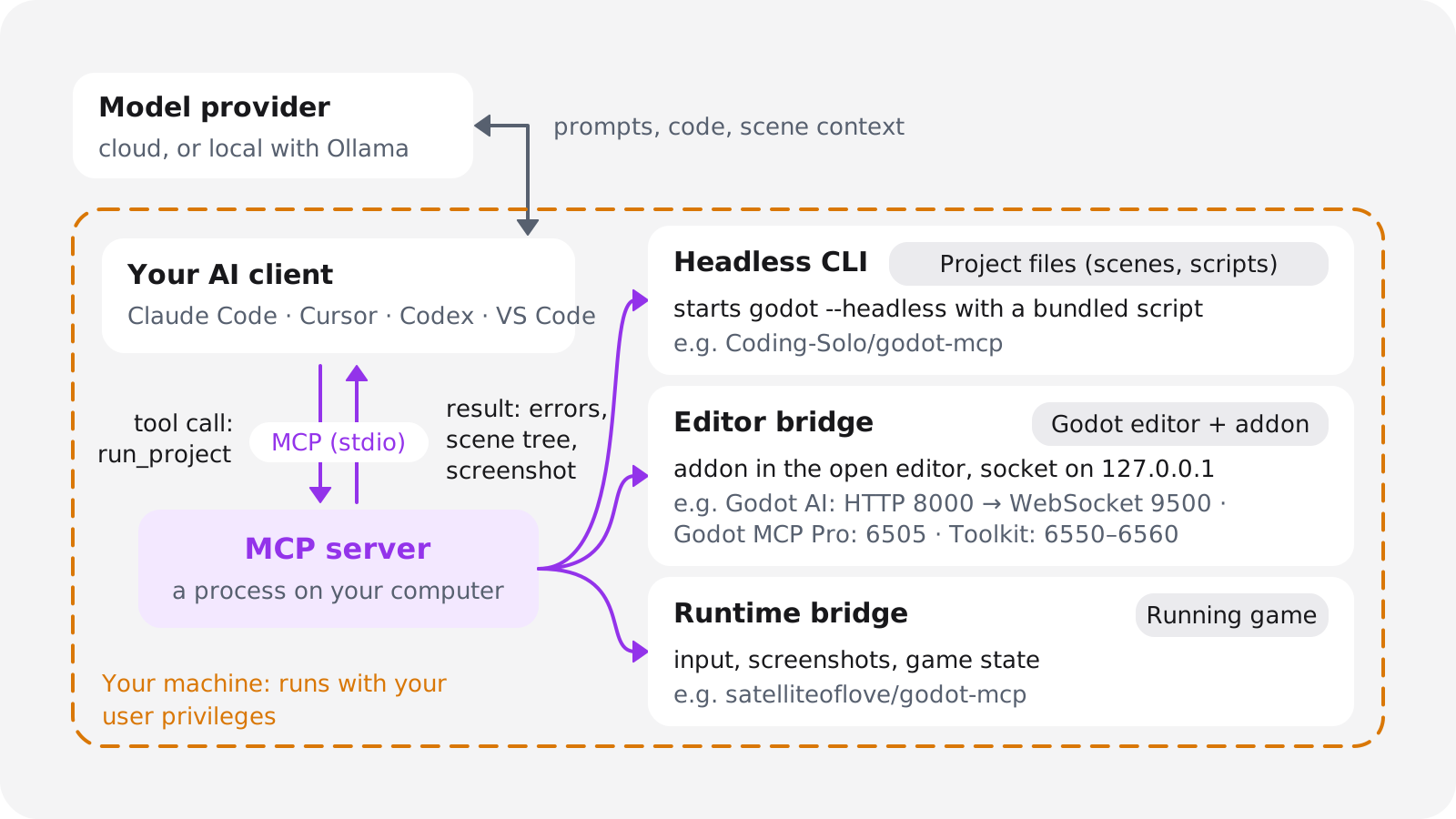
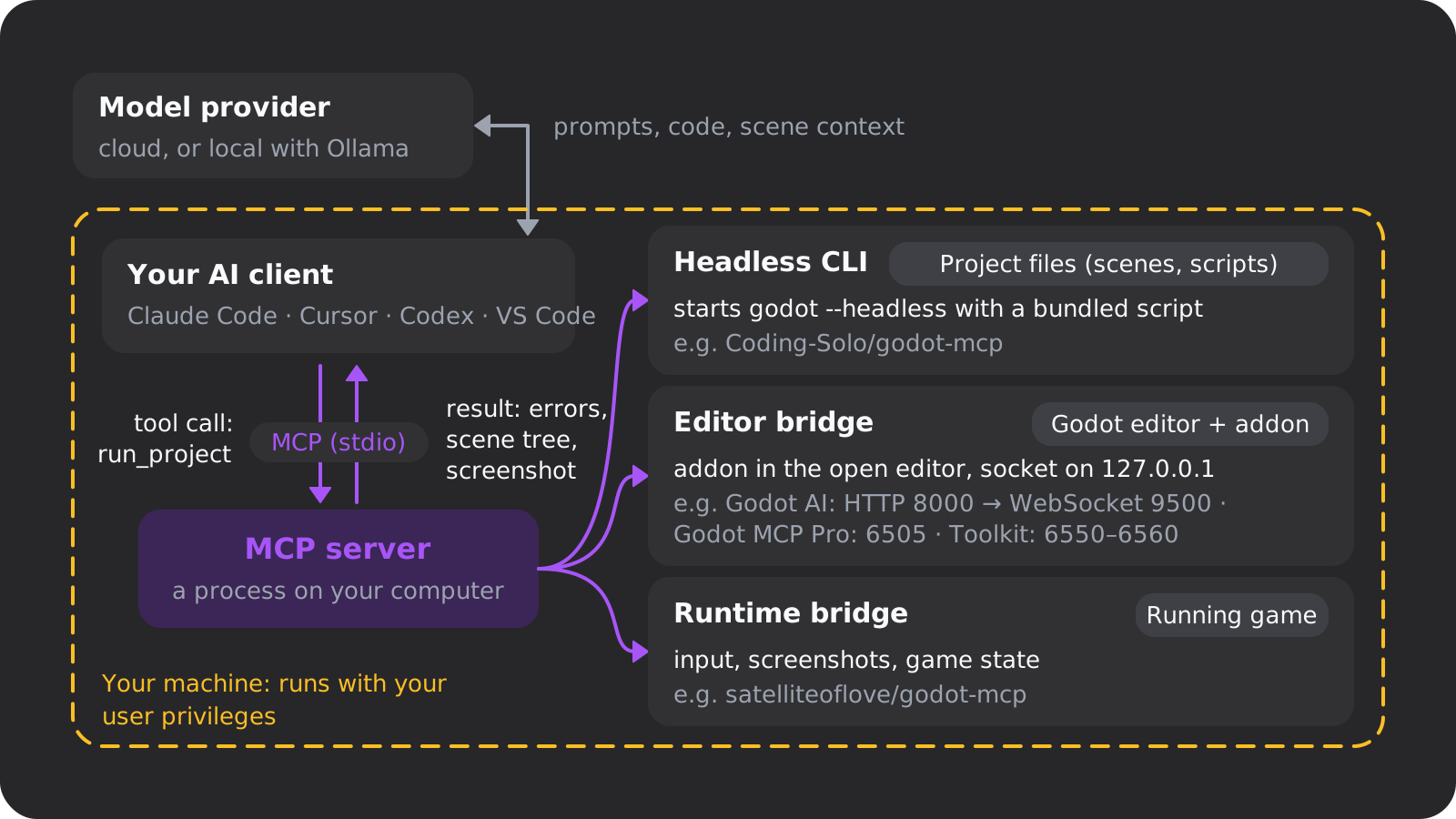
If you only want an AI that runs your game and reads errors, a headless server is enough. If you want it to build scenes in the editor while you watch, you need a bridge.
Godot MCP servers compared (November 2026)
Stars and last activity (latest commit or release) come from the GitHub API on November 1, 2026, prices from each vendor's page on the same day.
| Server | Stars · last activity | Licence · price | Godot | What it does |
|---|---|---|---|---|
| Coding-Solo/godot-mcp | 6,461 · 2026-04-16 | MIT · free | Any 4.x | Headless: runs the project, reads debug output, creates scenes, adds nodes. No screenshots or input |
| Godot AI (hi-godot) | 3,326 · 2026-10-25 | MIT · free | 4.7+ | Live editor bridge, 46 tools: scenes, scripts, signals, UI, materials, animation. Python server via uv |
| Godot MCP Native | 867 · 2026-08-03 | MIT · free | 4.x | Server written in Godot itself, no Node.js. 155 tools, screenshots, optional auth token |
| Godot MCP Pro | 641 · 2026-09-24 | Public addon, paid server · one-time | 4.4–4.7 | Editor bridge, 187 tools per its README, lite and minimal modes, CLI mode |
| tugcantopaloglu/godot-mcp | 508 · 2026-10-09 | MIT · free | 4.x, GDScript and C# | Coding-Solo fork with 157 tools, runtime control, script validation, an arbitrary-code tool |
| Godlink MCP (tomyud1) | 448 · 2026-10-17 | MIT · free | 4.4+ | Editor addon plus an npx server, 69 tools, undo and redo, screenshots, input |
| IvanMurzak/Godot-MCP | 320 · 2026-10-31 | Apache-2.0 · free | 4.3+ .NET build | C# addon, 24 tools, screenshots, cloud or self-hosted server |
| GoPeak | 269 · 2026-09-12 | MIT · free | 4.x | 95+ tools, GDScript language server and debugger, screenshots, input |
| satelliteoflove/godot-mcp | 183 · 2026-09-16 | MIT · free | 4.5+ | Playtesting: freezes and steps game time, real input, runtime state as JSON |
| GDAI MCP | 103 · 2026-09-11 | No open licence · $19 once | 4.2+ | Automatic screenshots of editor and game, simulated input, debugger and logs |
| Godot MCP Toolkit | 97 · 2026-11-01 | Not detected by GitHub · free | 4.2–4.7 | Local only, no telemetry, read-only mode, 113 tools |
| Funplay MCP | 49 · 2026-10-10 | MIT · free | 4.2+, .NET too | Built around one code-execution tool with safety checks, per-project token |
| Godot Editor MCP (hybridindie) | 48 · 2026-11-01 | MIT · free | 4.4 | 180 tools, dry runs for edits, confirmation for destructive tools |
Skip two older projects that still turn up in searches: ee0pdt/Godot-MCP (621 stars, no commit since March 19, 2025) and bradypp/godot-mcp (90 stars, none since May 31, 2025). IvanMurzak's server is the one built for C#, with a Unity twin called Unity-MCP. If you're still picking an engine, see our Godot vs Unity comparison.
Four servers worth starting with
Free · MIT · simplest start
Coding-Solo/godot-mcp
- Most-starred Godot MCP server, with 49,598 npm downloads from September 30 to October 29, 2026
- Runs your project and reads debug output, no editor addon
- No screenshots or input. Install it from GitHub source (see the setup below)
Free · MIT · our pick on Godot 4.7
Godot AI (hi-godot)
- Live editor bridge with 46 tools and 120+ operations
- Claims 21,000+ monthly active installs, from its own anonymous telemetry
- Signed releases and published security advisories. Needs Godot 4.7+ and uv
$19 once · closed source
GDAI MCP
- Automatic screenshots of the editor and the running game
- Simulated input, debugger and logs
- Godot 4.2+. Its FAQ says not to commit the plugin to a public repository
Paid server · one-time purchase
Godot MCP Pro
- 187 tools per its README, with lite and minimal (35 tools) modes
- Godot 4.4 to 4.7
- Version 1.17.1 fixed two security bugs on September 24, 2026
On Godot 4.7, start with Godot AI. It's free, it works in the editor you already have open, and its maintainers sign releases and publish an advisory when they fix a hole. On an older Godot, or if you don't want an addon in your project, start with Coding-Solo. Paid servers mostly buy you screenshots and input with less setup, and free ones like Godlink MCP and GoPeak have both too.
What the only head-to-head test found
One public test runs several servers through the same tasks, and a vendor ran it: Flockbay, which makes a free AI game maker built on Godot, entered its own server in the MCP bake-off of October 25, 2026. Four servers (Flockbay, Coding-Solo, GoPeak, satelliteoflove) had to edit a scene, fix a Godot 3 script and run it, and read a runtime error. Each ran once on Claude Code with Claude Sonnet 5.5 and Godot 4.7.2. All four passed all three, within seconds of each other. Godot AI, GDAI MCP and Godot MCP Pro weren't tested.
So on the basics they're equal. Choose on what differs: screenshots, input, the Godot version floor, the runtime you install (Node, Python with uv, .NET or nothing), price and tool-list size.
Big tool lists cost context
Every tool's name and description go to the model before it does any work. Godot MCP Toolkit's README puts its starting tool set at about 8,800 tokens. Godot MCP Pro ships full, 3D, lite and minimal modes plus a CLI mode that reveals tools as needed, and Godot MCP Native has a gdmcp CLI for the same reason. Flockbay's Godot MCP server comparison (a vendor source) notes that a long tool list can hurt the agent. Our view: turn on the smallest mode that covers your task, and add tools when the model asks for one it lacks.
How to set up a Godot MCP server safely
These steps install Coding-Solo/godot-mcp, the most-starred server, so that you get the patched code. The README's one-liner, claude mcp add godot -- npx @coding-solo/godot-mcp, pulls the npm package instead, and that package is behind.
Why build from GitHub instead of npm
- April 10, 2026: issue #95 reported remote code execution through the
add_nodetool. A node type such asres://evil.gdmade the server load and instantiate that script, which runs its_init()code. - April 16, 2026: PR #99 fixed it by validating identifiers and removing the fallback that loaded scripts.
- The npm package:
@coding-solo/godot-mcpis at version 0.1.1, published February 3, 2026, the only version ever published. As of November 1, 2026,npxinstalls code from before the fix.
This isn't a scandal. Someone reported a bug, the maintainer merged a fix within a week, and a new npm release hasn't followed (package.json on the main branch still says 0.1.1). Until one does, run the GitHub source, which the README's own "Building from Source" section covers.
Before you start
You need Godot 4 (the current stable release is 4.7.2, from August 18, 2026), Node.js 18 or newer with npm, git, and an MCP client. Coding-Solo works with any installed Godot 4, though its UID tools need 4.4 or newer.
Commit your project
Run
git initin the project folder if it isn't a repository yet, then commit. Every change the AI makes is then agit diffyou can review and undo withgit restore.Clone and build the server from GitHub
Run
git clone https://github.com/Coding-Solo/godot-mcp.git, thennpm installandnpm run buildinside the new folder.git log -1should show a commit from April 16, 2026 or later.Register your local build with the client
In Claude Code:
claude mcp add godot -e GODOT_PATH=/path/to/godot -- node /full/path/to/godot-mcp/build/index.js. That points the client at your build instead of atnpx.Leave approvals on
Don't copy the README's Cline example, which auto-approves all 14 tools, and skip the "Yolo Mode" it suggests for Cursor. Approve each
run_projectandadd_nodecall yourself until you've seen what the model does with them.Restart and test read-only
Restart the client and check that the server is listed (in Claude Code, type
/mcp). Then ask for something harmless, like the installed Godot version or a summary of your project.Update from git, not npm
When the repository changes, run
git pullandnpm run buildagain. Watch its issues and pull requests, since that's where the April fix appeared first.
The same server in Codex, Cursor and other clients
Codex reads MCP servers from ~/.codex/config.toml, or .codex/config.toml in a trusted project, and codex mcp add writes the entry for you (Codex docs):
[mcp_servers.godot]
command = "node"
args = ["/full/path/to/godot-mcp/build/index.js"]

[mcp_servers.godot.env]
GODOT_PATH = "/path/to/godot"
Cursor takes this block in .cursor/mcp.json in your project, and Claude Desktop in claude_desktop_config.json (Settings, Developer, Edit Config):
{
  "mcpServers": {
    "godot": {
      "command": "node",
      "args": ["/full/path/to/godot-mcp/build/index.js"],
      "env": { "GODOT_PATH": "/path/to/godot" }
    }
  }
}
VS Code has its own format, described in VS Code's MCP server docs. For Windsurf, check its current docs for the config file location.
Prefer a live editor? Godot AI in four steps
Godot AI needs Godot 4.7 or newer and uv, which runs its Python server.
- Install uv once.
- Install the addon from the editor's Asset Store tab, or unpack a GitHub release into
addons/godot_ai/. - Enable it under Project, Project Settings, Plugins.
- In the Godot AI dock, press Configure next to your client.
Use the command the dock generates, because a bare http://127.0.0.1:8000/mcp entry cannot authenticate. To upgrade, press Update in the dock and never extract a new version over the old folder. On Godot 4.6 and older, the editor's AssetLib tab offers Godot AI 3.2.5 instead, built for Godot 4.5 (asset 5050).
If it doesn't connect
- Godot not found: set
GODOT_PATHto the full path of the Godot executable. - Server missing: restart the client fully. In Cursor, press refresh on the MCP server card.
- Invalid project path: the folder must contain
project.godot.
First prompts to try
Start with prompts that only read, then make one small change at a time:
- "What Godot version is installed, and what's in this project?"
- "Run the project and show me any errors in the debug output."
- "Create a scene with a CharacterBody2D player, a Camera2D and a floor, save it as
res://scenes/test.tscn, then run it and fix any errors."
For a practice project scoped for an AI pair, our guides to building a 2D platformer, making a 3D game and a small horror game each keep the first version small.
Godot AI plugins and assistants
If you want a Godot AI assistant without setting up an MCP client, there are plugins that put a chat or an agent in an editor dock, external editors that understand GDScript, and AI-native editors that replace Godot's own. "Godot AI plugin" mostly means an MCP bridge addon these days, and the older chat plugins have gone quiet.
| Tool | What it is | Models | Price (Nov 2026) | Status |
|---|---|---|---|---|
| AI Assistant Hub | Chat dock with tools, Godot 4.3+ | Ollama, llama.cpp, Gemini, Jan, OpenRouter, OpenWebUI, xAI | Free, MIT | v2.1.0, 2026-09-01 |
| Ziva | Proprietary in-editor agent, Godot 4.2+ | Claude, GPT, Gemini, your own Claude Code or Codex, Ollama, LM Studio | Hobby free, Basic $20/month, Pro and Ultra prices not shown | Active |
| Godot AI (hi-godot) | MCP bridge addon, Godot 4.7+ | Whatever your MCP client uses | Free, MIT | v4.3.1, 2026-10-24 |
| Fuku | Chat dock, Godot 4.5 | Ollama, OpenAI, Claude, Gemini, Docker Model Runner | Free, MIT | v1.1.0-8, 2025-10-02 |
| Godot Copilot | Code completion on a shortcut | OpenAI | Free plugin, you pay for the API | No commit since 2024-04-17 |
| godot-tools with Copilot or Cursor | External editor with GDScript support | The editor's own models | Copilot or Cursor subscription | godot-tools v2.7.1, 2026-06-17 |
| Summer Engine | AI-native editor, its own app | Hosted models | Free app (5 AI messages a day), Pro $20, Pro+ $60, Ultra $200 a month | Active |
AI Assistant Hub is the one to try for a free assistant, or one that never leaves your machine. It doesn't run models itself but connects to a provider, with Ollama as the maintainer-supported one. Each tool is set to Allow, Ask or Hide, and write tools default to Ask, which is the right default.
Ziva is the main commercial in-editor agent. It runs hosted Claude, GPT and Gemini models, your own Claude Code or Codex subscription, or local models through Ollama or LM Studio, and says it never uses your code for training. Ziva also wrote the dev.to comparison of Godot AI plugins that Google's AI Overview cites, which ranks Ziva first in every column, so read it as a vendor source.
Copilot or Cursor with the official godot-tools extension (2,139 stars) covers writing GDScript, but neither can see or drive the Godot editor unless you add an MCP server. Summer Engine is a separate editor with AI built in that says it opens Godot 4 projects. It replaces the editor you work in rather than plugging into it.
Two small plugins come with warnings. Fuku can save API keys to addons/fuku/.env base64-encoded, which its README says is not encryption, and Godot Copilot warns that reusing a GitHub Copilot token may get accounts suspended. To browse further, the Asset Store's #ai tag listed 43 results on November 1, 2026.
How well does AI write GDScript for Godot 4?
The best models now pass basic Godot 4 tasks reliably, and smaller ones still slip into Godot 3. The fix is the same either way: let the AI run your code and read Godot's errors.
Why AI writes Godot 3 code
Most models learned Godot from years of Godot 3 tutorials, and Godot 4 renamed or replaced much of what those tutorials use. The 3.x line isn't finished either: Godot 3.6.3 shipped on August 22, 2026, so new Godot 3 material keeps appearing. The old Godot Copilot plugin's README already warned that GDScript is underrepresented in OpenAI's training data.
These changes from the official Godot 3 to 4 migration guide trip models up most:
| Godot 3 (what AI often writes) | Godot 4 | What changed |
|---|---|---|
KinematicBody2D, KinematicBody | CharacterBody2D, CharacterBody3D | Node renamed |
Spatial | Node3D | Node renamed |
Sprite, Particles2D | Sprite2D, GPUParticles2D | Nodes renamed |
File, Directory | FileAccess, DirAccess | Entirely different API |
instance() | instantiate() | Method renamed |
tool | @tool | Now an annotation |
Tween node | create_tween() and Tweeners | Node removed |
change_scene() | change_scene_to_file() | Method renamed |
update() on a CanvasItem | queue_redraw() | Method renamed |
connect("signal", obj, "method") | signal.connect(callable) | Signal syntax recommended |
The benchmark below names two more typical mistakes: move_and_slide() called with arguments, and export var without the @. Godot 4 rejects both. One quiet change from the guide: _ready() no longer calls the parent's version for you.
What the benchmarks show
The most useful public test is godot-llm-bench, and it's a vendor source: Flockbay, which makes a competing AI game maker, built and ran it. It's still worth reading because the tasks and runner are open, and Godot itself judges every result. Fifteen GDScript tasks, each touching an API that changed between Godot 3 and 4, ran headless on Godot 4.7.2 on October 6, 2026, one run per model.
| Model | Agent | First try | After one fix |
|---|---|---|---|
| Claude Opus 5.5 | Claude Code | 15 of 15 | 15 of 15 |
| Claude Sonnet 5.5 | Claude Code | 15 of 15 | 15 of 15 |
| GPT-6.1 Sol | Codex | 15 of 15 | 15 of 15 |
| Claude Haiku 4.5 | Claude Code | 11 of 15 | 14 of 15 |
Across 28 models, 12 passed all 15 tasks on the first try, three of them among the five cheapest hosted models measured. The authors' own reading is that these tasks are now the floor, not the ceiling. That's fair. Moving a character and saving JSON don't prove an AI can build a whole game, and server makers say so themselves: the Godlink author wrote on the Godot Forum that it can't build an entire game in one shot, and GDAI's FAQ answers the same question with "yes and no".
Five habits that cut AI GDScript errors
- Name the version. Put "Godot 4.7" in your prompt or in the rules file your client reads for the project.
- Close the loop. Use a server that runs the project and reads errors, so the model fixes its own mistakes first.
- Give it the docs. godot-mcp-docs serves the Godot documentation over MCP, and Flatten For LLM on the Asset Store exports your scripts, scenes and shaders into one Markdown file.
- Validate before running. minimal-godot-mcp checks scripts through Godot's language server, and tugcantopaloglu's
validate_scriptcompiles them with autoloads loaded. - Keep scripts small and give it a plan. An agent with a clear target writes less code it has to undo, so write a short game design document first.
Godot MCP security: a server that runs your project can run code
A Godot MCP server isn't a sandbox. It's a process running as you, and running a Godot project means running every script in it, including addons and downloaded assets. Some servers go further and offer a tool that executes any GDScript the model hands it.
What a local server can do on your machine
The MCP spec's own security best practices cover this under "Local MCP Server Compromise". Local servers may have direct access to your system, and the listed risks are arbitrary code execution with the client's privileges, data exfiltration and data loss. Clients must show the exact command and ask for consent before a one-click install, and should sandbox servers. Servers should use stdio or protect HTTP with an auth token.
Prompt injection is how this goes wrong in practice. An agent reads scripts, scene files and an addon's README. If one of them contains instructions, the model may follow them. With approvals on, you're the check. With auto-approve, nothing stands between that instruction and your files.
What went wrong in 2026, and what got fixed
- Coding-Solo/godot-mcp: the
add_nodecode execution bug, fixed on GitHub on April 16, 2026 but not yet in the npm package (see the setup section). - Godot AI: four security advisories on October 24, 2026. Three were rated high: a path confinement bypass that allowed writes outside the project and a
project.godotoverwrite, an--allow-hostoption that trusted a spoofable Host header, and a config writer that loosened credential files from 0600 to 0644. The medium one let Windows path aliases bypass the write blocklist. All four are fixed. - Godot MCP Pro: version 1.17.1 on September 24, 2026 fixed a Windows command injection, where a crafted scene path with a bare line feed could run a second command, and input IDs that could name any
user://file. Both came in with 1.17.0. - Code execution by design: tugcantopaloglu's
game_evalruns arbitrary GDScript in the running game. Funplay'sexecute_codehas safety checks on by default, which a call can switch off. satelliteoflove hasgodot_exec, and IvanMurzak's server can call any method, though its connection is off by default.
Read that list the right way: published advisories and quick fixes are what good maintenance looks like. Godot AI's README lists signed releases, rotating credentials and a loopback-only editor socket, and says plainly that more critical vulnerabilities will appear. The real risk is old versions and approving everything.
A safety checklist
- Install from the source the maintainer updates, and pin a version. Read release notes and advisories before you update.
- Prefer servers on 127.0.0.1 with an auth token. Godot MCP Native's token is optional, so turn it on.
- Keep write and exec tools on "ask". No auto-approve lists or Yolo Mode on a project with downloaded addons or assets.
- Commit before each session, so every AI change is a diff you can read and revert.
- Explore read-only first. Godot MCP Toolkit hides every tool that changes things when you set
GODOT_MCP_READ_ONLY=1, and Godot Editor MCP supports dry runs. - Keep API keys out of
addons/and out of git. - Open projects you didn't make in a VM or container.
- Check telemetry settings before you connect a client.
What leaves your machine
The server is local, but the model usually isn't. Your prompts, code and scene context go to whichever provider your client uses. Godot AI sends anonymous telemetry (an install ID, events, outcomes and platform, never code or file names) unless you set GODOT_AI_DISABLE_TELEMETRY=true. Godot MCP Toolkit sends none apart from a daily GitHub update check. If inference must stay on your machine, use AI Assistant Hub with Ollama or llama.cpp, or Ziva with Ollama or LM Studio.
Godot's AI policy: engine contributions vs your own games
Three different things get mixed up here.
Contributing to the engine: restricted. On June 30, 2026 the Godot Foundation announced a contribution policy update. It bans autonomous AI agents and "vibe coding" in engine pull requests, prohibits substantial AI-generated code, and bans AI-generated text in conversations with maintainers, though machine translation of your own words is fine. AI for small jobs such as code completion, regex or find-and-replace is allowed if you disclose it in the pull request. The amended rules were to arrive "shortly", with no effective date given. Game Developer covered it on July 1, 2026, quoting the maintainers' worry that heavy AI users can't be trusted to understand their code well enough to fix it.
Selling on the Asset Store: allowed, with disclosure. The Asset Store FAQ lets you upload AI-generated assets or code if you disclose what is AI-generated and how AI was used, even when you edited the output by hand.
Your own game: not covered. The policy article doesn't address games made with Godot, and nothing in these policies restricts AI in your own project. Godot itself is MIT-licensed, and plugin makers and their users aren't the target either.
Expect mixed feelings anyway. The policy landed with a lot of debate in July 2026, and parts of the Godot community are openly hostile to AI-written code. If you share an AI-assisted project there, saying how you used AI saves you an argument.
MCP server, AI plugin or AI game maker: which fits you
Everything above assumes you work in the Godot editor. Not everyone wants to, and that's a different category of tool.
| What matters | MCP server + your AI client | In-editor AI plugin | AI game maker (Oryn) |
|---|---|---|---|
| Who does the work | Your AI client, in your project, with you approving | You, with a chat or agent in a dock | Oryn plans and builds, you describe and steer in chat |
| You need | Godot 4, a client like Claude Code, Cursor or Codex, plus Node, uv or .NET per server | Godot 4 and an API key, subscription or local model | A browser and a free account |
| Coding skill | Helpful to essential: you review diffs and errors | Helpful | Not required, and the files are there if you want them |
| Best at | Edits, debugging and test runs inside an existing project | Explaining and writing code in context, local models | Going from a description to a playable game in the browser |
| Weak at | Whole games from one prompt, setup, long tool lists | Acting on the whole project (chat-only plugins) | Hand-tuned control mid-build, and a build takes about 30 minutes |
| You end up with | Your own project, changed in place | Your own project | A Godot 4 project you can export as a .zip |
| Cost (Nov 2026) | Mostly free servers ($19 for GDAI) plus your client | Free to $20 a month and up | Free plan, paid plans on Oryn pricing |
| Safety surface | A local process with your privileges | A plugin in your editor, plus key storage | Runs in the browser, nothing to install |
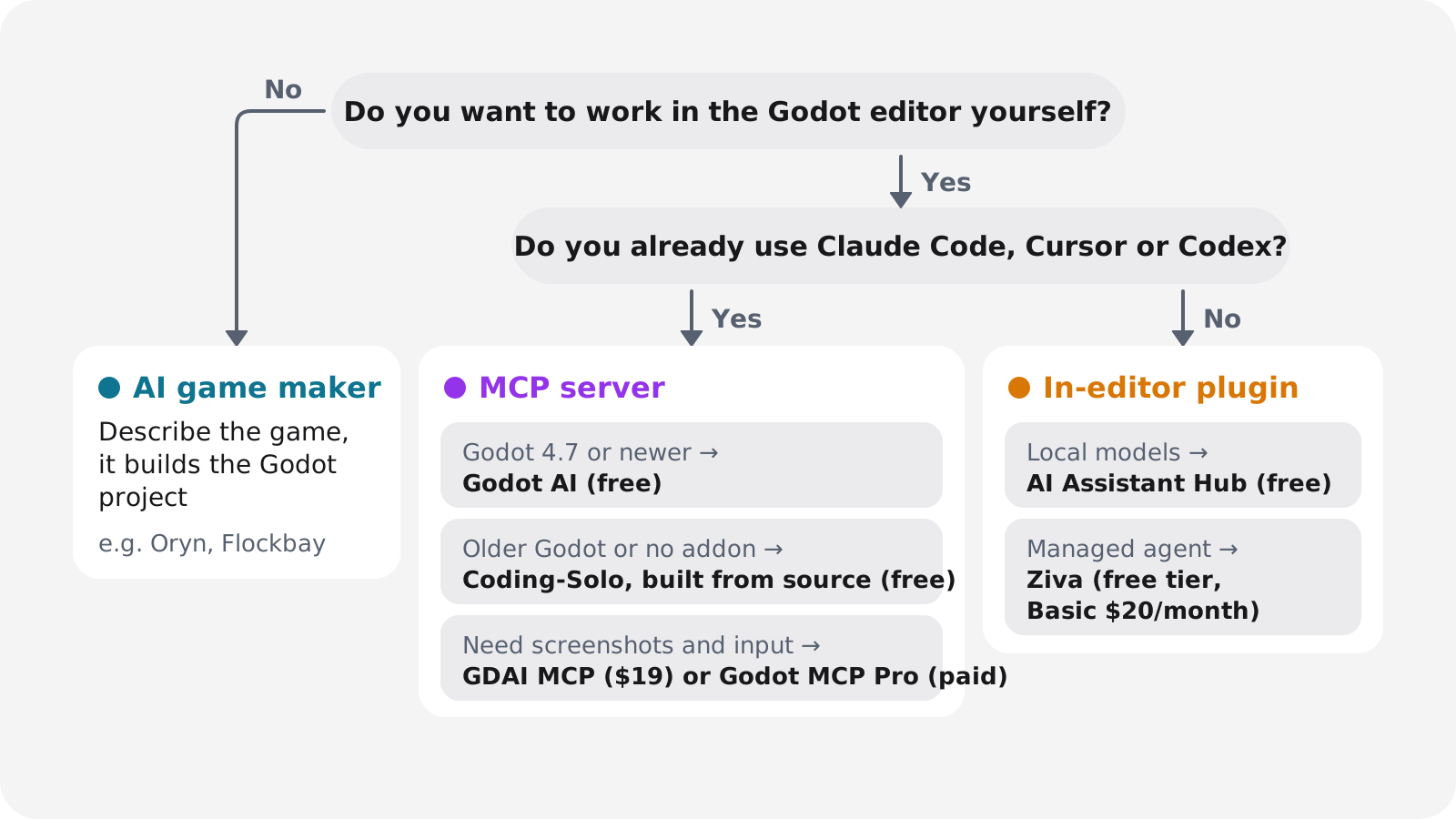
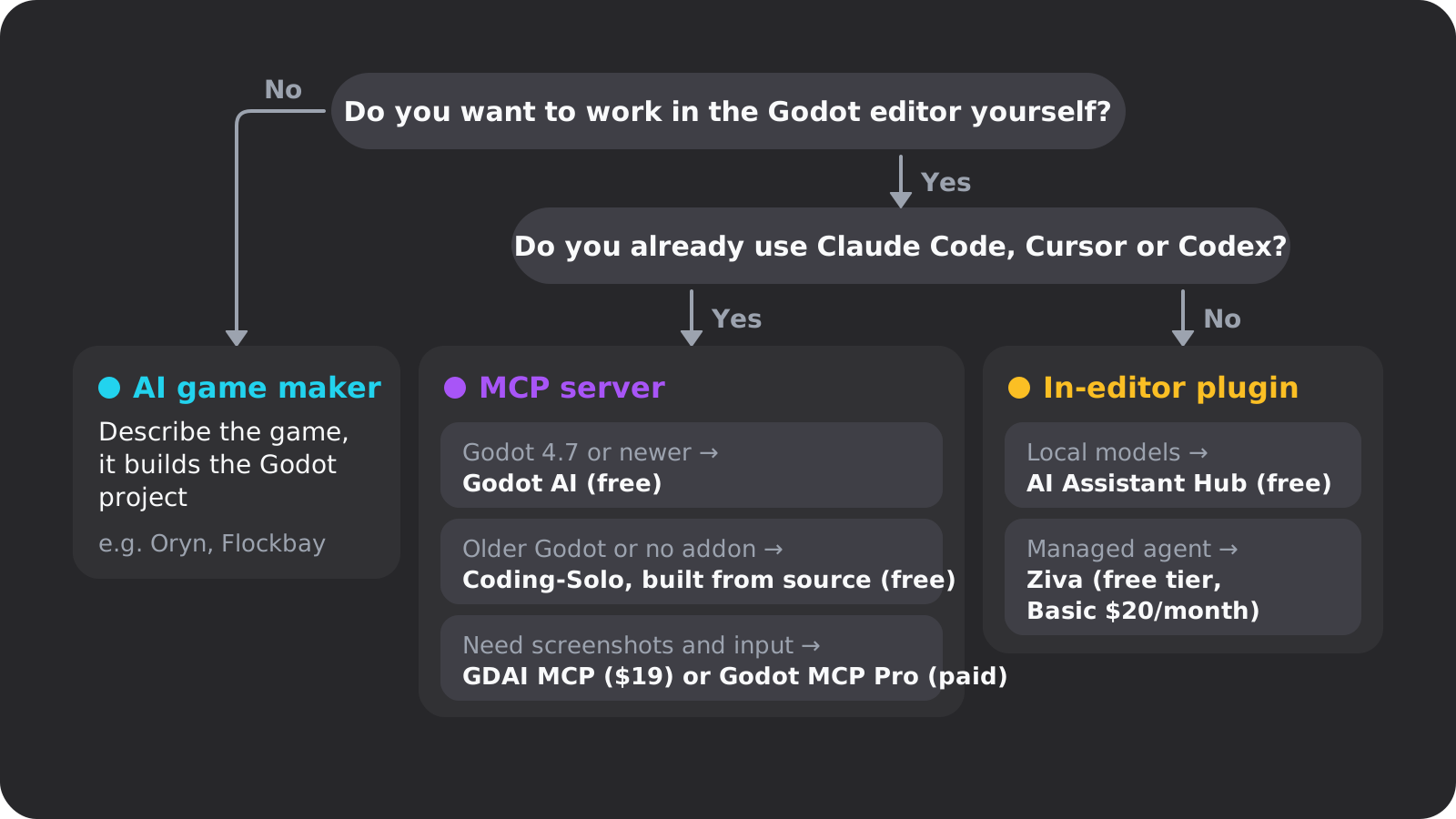
If you've never made a game at all, our guide on how to make a video game covers scope and engines before any of this.
Where Oryn fits
Oryn is an AI game maker, not an editor plugin and not an MCP server. It doesn't connect your AI client to your Godot editor. You describe a game, with reference images if you have them, answer a few planning questions and approve the game design document Oryn writes. Nothing is built until you approve. Then Oryn writes a real Godot project (scenes, scripts, input maps, UI and assets) and a web build you play in the browser, which the build button puts at about 30 minutes.
You keep changing the game in chat, and every working version is kept so you can restore one. To work on it elsewhere, export the full Godot project as a .zip that opens in Godot with no proprietary format or runtime. New projects currently use Godot 4.6.3, so check a server's minimum version in the table above before you attach one to an exported project. You can also publish to the public Oryn games shelf, and the free plan lets you design up to three games and builds the first one.
The honest limits: AI output varies between runs and needs review and testing, and you give up some fine control in exchange for not building it by hand. Flockbay, a free, closed-source desktop app that runs its own MCP server for an agent you bring, is another Godot-based AI game maker. Our roundup of AI game makers compares the wider field.
Your next step depends on one answer. If you want to stay in the Godot editor and you're on 4.7, install Godot AI and ask it to show you your current scene tree. On an older version, build Coding-Solo from source with the steps above and ask it to run your project and read the errors. If you'd rather describe the game and play it, paste the brief above into Oryn and answer its planning questions.
Frequently asked questions
What is Godot MCP?
Godot MCP is an MCP server that lets an AI app such as Claude Code, Cursor or Codex run your Godot project, read its errors and edit scenes and scripts. MCP is an open standard Anthropic introduced on November 25, 2024, now part of the Linux Foundation's Agentic AI Foundation.
Is there an official Godot MCP server?
No. As of November 1, 2026, Godot ships no official MCP server and no built-in AI assistant. Every Godot MCP server and AI plugin is a community or commercial project.
Is Godot MCP free?
Most servers are free and MIT-licensed, including Coding-Solo/godot-mcp, Godot AI, Godot MCP Native and Godlink MCP. GDAI MCP costs $19 once and Godot MCP Pro's server is a paid one-time purchase. Your AI client may still need its own subscription or API key.
Which Godot MCP server should I use?
On Godot 4.7 or newer, start with Godot AI for free live editor control. On older versions, use Coding-Solo/godot-mcp built from its GitHub source, or GDAI MCP or Godot MCP Pro if you want screenshots and input with little setup.
Why does AI give me Godot 3 code?
Models learned from years of Godot 3 tutorials, so they still write names like KinematicBody2D that Godot 4 renamed. Name your Godot version in the prompt and use a server that runs the project, so the AI sees Godot's errors and fixes them.
Is it safe to let an AI control my Godot editor?
With care. A local MCP server runs with your user privileges, several servers can execute arbitrary GDScript, and the two biggest free servers both fixed security bugs in 2026. Keep write and exec tools on ask, commit to git before each session and update promptly.
Does Godot allow AI-generated code in games?
Yes for your own games, which Godot's policies do not restrict. The Asset Store accepts AI-generated assets and code with disclosure, and only contributions to the engine itself are restricted, under a policy announced on June 30, 2026.
What is the difference between Godot MCP and an AI game maker like Oryn?
With MCP you stay the developer, and your AI client edits your project in your own Godot editor. Oryn is an AI game maker, not an editor plugin: you describe a game, approve a plan, and it builds a Godot project you play in the browser and can export as a .zip.